1
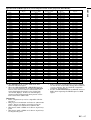
ITEM
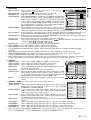
SPLASH SCREEN
BACK COLOR
LAMP MODE
IMAGE REVERSE
MENU POSITION
EXPAND MODE
AUDIO MODE
VIDEO SIGNAL
ASCII
SS
BB
LM
IR
MP
EX
AU
VS
HEX
53h
42h
4Ch
49h
4Dh
45h
41h
56h
53h
42h
4Dh
52h
50h
58h
55h
53h
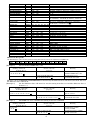
ANAMORPHIC
LANGUAGE
SC
LG
53h
4Ch
43h
47h
RESET ALL
MEMORY CALL
HORIZ. POSITION
VERT. POSITION
FINE SYNC.
TRACKING
COMPUTER INPUT
HOLD
HOLD BEGIN
HOLD END
CLAMP POSITION
CLAMP WIDTH
HORIZ. PIXELS
VERT LINES
VERT.SYNC
SHUTTER (U)
SHUTTER (L)
SHUTTER (LS)
SHUTTER (RS)
MUTE
RSTALL
MMC
HP
VP
FN
TRK
CIN
HLD
HLB
HLE
CLP
CLW
HPL
VLN
VSC
SHU
SHL
SHLS
SHRS
MUTE
52h 53h 54h
4Dh 4Dh
48h 50h
56h 50h
46h 4Eh
54h 52h
43h 49h
48h 4Ch
48h 4Ch
48h 4Ch
43h 4Ch
43h 4Ch
48h 50h
56h 4Ch
56h 53h
53h 48h
53h 48h
53h 48h
53h 48h
4Dh 55h
VALUE
0 (OFF), 1 (ON)
0 (BLACK), 1 (BLUE)
0 (STANDARD), 1 (LOW)
0 (OFF), 1 (Mirror), 2 (Invert), 3 (Mirror invert)
0 (Upper left), 1 (Lower right)
1-2
1 (COMPUTER), 2 (VIDEO), 3 (COMPUTER & VIDEO), 4 (MUTE)
0 (AUTO), 1 (NTSC), 2 (PAL), 3 (SECAM) ,
4 (4.43NTSC), 5 (PAL-M), 6 (PAL-N), 7 (PAL-60)
0 (OFF), 1 (ON)
0(
), 1 (English), 2 (Español), 3 (Deutsch) ,
4 (Frençais), 5 (Italiano), 6 (
)
41h 4Ch 4Ch
43h
0 (AUTO), 1 (USER1), 2 (USER2)
+ (increase), – (decrease)
+ (increase), – (decrease)
00 - 39
4Bh
+ (increase), – (decrease)
4Eh
0 (RGB), 1 (YCBCR/YPBPR)
44h
0 (AUTO), 1 (ON), 2 (OFF)
42h
–01 - –99
45h
01 - 99
50h
00 - 63
57h
01 - 63
4Ch
0000 - 9999
4Eh
0000 - 9999
43h
0 (AUTO), 1 (ON), 2 (OFF)
55h
000 - 383 (000 - 299 for SL1U)
4Ch
000 - 383 (000 - 299 for SL1U)
4Ch 53h
000 - 510 (000 - 398 for SL1U)
52h 53h
000 - 510 (000 - 398 for SL1U)
54h 45h
0 (MUTE OFF), 1 (MUTE ON)
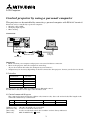
How to set the grade
Use ASCII letters code to set the grade for setting data. Please refer to the table below for HEX code.
ASCII
HEX
'+'
2Bh
[Example 1]
'–'
2Dh
'0'
30h
'1'
31h
'2'
32h
'3'
33h
'4'
34h
'5'
35h
'6'
36h
'7'
37h
'8'
38h
'9'
39h
Set the AUTO POWER ON to ON.
Sending commands
from the PC etc.
Status code from
projector
Meaning
30 30 41 50 4F 4E 31 0D
'0' '0' 'A' 'P' 'O' 'N' '1' ' '
Command for setting the
AUTO POWER ON to ON
30 30 41 50 4F 4E 31 0D
'0' '0' 'A' 'P' 'O' 'N' '1' ' '
Command received
(Command echo back)
The data code of CONTRAST and BRIGHTNESS is structured by the difference data of R from G, the main data and
the difference data of B from G.
[Example 2]
Set the difference data of R from G to +10, the setting main data to 0 and the difference data of
B from to -5.
Sending commands
Status code from
from the PC etc.
30 30 50 2B 31 30 2B 30 30 2D 30 35 0D
projector
'0' '0' 'P' '+' '1' '0' '+' '0' '0' '-' '0' '5' '
[Example 3]
Command for setting the
'
30 30 50 2B 31 30 2B 30 30 2D 30 35 0D
picture control
Command received
'0' '0' 'P' '+' '1' '0' '+' '0' '0' '-' '0' '5' '
(Command echo back)
'
The TINT was set to +10 when the setting status was confirmed.
Sending commands
from the PC etc.
30 30 53 0D
'0' '0' 'S' '
Meaning
Status code from
Meaning
projector
Command to confirm
'
30 30 53 2B 31 30 0D
setting of TINT
Command (setting of TINT
'0' '0' 'S' '+' '1' '0' '
is +10) carried out
4
'