1
Sanctuary Device Control v4.3.2 - User Guide
The Sanctuary Database
The Sanctuary Database serves as the central repository of authorization information, such as lists
of executable files, scripts and macros, the digital signatures (‘hashes’) that uniquely identify these
files, File Groups, authorized users and User Groups, device permissions, and user policies. It also
stores audit logs of administrator’s actions.
This database is built on the Microsoft SQL Server 2000/2005 or 2005 Express Edition. For
organizations with fewer than 200 users, the SQL Server 2005 Express Edition is sufficient. Larger
organizations must use Microsoft SQL Server.
The Sanctuary Application Server
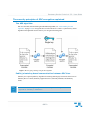
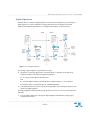
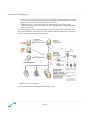
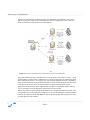
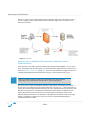
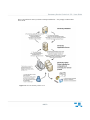
Each Sanctuary installation requires at least one Sanctuary Application Server and related Data File
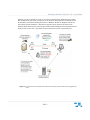
Directory (which may or may not be on the same machine) to store log information. All servers can
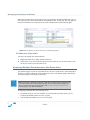
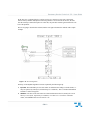
either write to the same shared directory, or alternatively, a different one for each server (see Figure
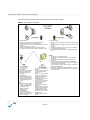
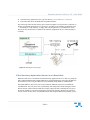
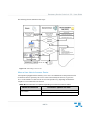
D.1, “Sanctuary components” on page 390 ). The Sanctuary Application Server communicates
between the Sanctuary Database and the protected servers or computers.
The Sanctuary Application Server component runs as a Windows Service under any domain user
account capable of reading Domain users/groups/computers accounts from the Domain Controller.
It performs the following functions:
•
Gets the latest information about access privileges and device I/O permissions from the
database and stores it in its cache.
•
Signs or encrypts the list, compresses it, and passes the updated access information list to
servers and computers, where it is also stored locally. (The updates contain the changes to the
permissions rather than the whole list.)
•
Saves a log of administrators and, optionally, users actions (including information about where
application or device access have been denied).
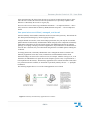
The Sanctuary Application Server runs as a service and keeps track of the connected clients and
their status, coordinating data flow between Sanctuary Application Servers — if you are using more
than one — and the SQL database. As with other TCP-based services, Sanctuary Application Server
cannot handle clients connecting through a firewall or proxy unless the required ports are opened.
By default, it uses port 65129 or 65229 (for the TLS protocol) to listen to clients’ or other Sanctuary
Application Server’s requests. Clients use port 33115, by default, to receive information (and
- 391 -