1
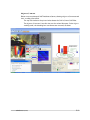
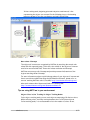
In line tracking mode, beginning point and end point coordinates of a line
representing the object are returned. In the following picture, the bounding
boxes are drawn for the line coordinates received from NXTcam:
More about Colormaps
The objects of interest are recognized by NXTCam by matching the stored color
values with the captured image. To do that, color values of the objects of interest
need to be stored on NXTCam. These color values are known as Colormaps.
NXTCam can store up to 8 Colormaps and provide processed information of the
objects matching those Colormaps.
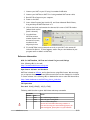
For more information on how to pick Colormap values of your objects of interest and
how to store them on NXTCam using the NXTCamView software, please refer to
section ‘teaching NXTCam colors’ from URL: http://nxtcamview.sourceforge.net/
Also watch a demo video ‘Capture and Select’ at following URL:
http://nxtcamview.sourceforge.net/DemoScreenCam.htm
Tips on using NXTCam in your environment
Object Colors in Line Tracking Vs Object Tracking Modes
In the object tracking mode, you can track objects comprising of 8 distinct colors.
While selecting colors, avoid any overlap between colors of different objects.
In line tracking mode, it is recommended to limit the number of colors to one.
mindsensors.com
6/13