1
MIDI Out from USB Mode
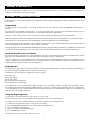
MIDI Out from USB Mode allows use of the M-Audio O2 as a USB-to-MIDI interface. When MIDI Out from USB Mode is engaged, data
transmitted from the MIDI Out port of the O2 is received at the USB port. If MIDI Out from USB is active and the M-Audio O2 is selected as the
USB output device in your software, all data from the software is passed to the MIDI Out port of the O2.
To activate MIDI Out from USB Mode:
1. Press the ADVANCED FUNCTION button.
2. Press the MIDI OUT key.
The LED display will show “USB,” indicating that the MIDI Out port is now set to transmit data from the USB port. Program Mode will
automatically cancel.
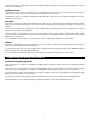
When MIDI Out from USB Mode is NOT active, the MIDI Out port will mirror the data that is sent via USB from the M-Audio O2 controller. To
disengage MIDI Out from USB Mode:
1. Press the ADVANCED FUNCTION button.
2. Press the MIDI OUT key.
The LED display will show ‘Int’. This indicates that the M-Audio O2 keyboard is transmitting data from the keys and controllers of the
M-Audio O2.
Resetting to the Factory Default Setting
To reset the M-Audio O2 back to the factory defaults, switch off the O2. Then, with the unit off, hold down the Preset +/- buttons and turn the
unit on.
Note: Restoring the factory presets will erase all setups you have stored to memory.
MIDI Messages Explained
Program and Bank Changes Explained
The original GM MIDI specification allowed for only 128 voices, numbered from 0-127. It is possible to access a different voice by sending a
Program Change.
In order to expand on the GM set of voices, Bank Changes were devised. Each bank contains 128 patches that can be accessed using a
Program Change. There are 16,384 available banks that can be accessed by sending a 14-bit Bank Change message. The first 7 bits of this
message are sent in a single byte known as the Bank LSB. The last 7 bits are specified by another byte known as the Bank MSB. The BANK
LSB is the most commonly used. This allows for 128 Bank Changes, and often there is no need to send a Bank MSB.
Almost all MIDI devices respond to the Program Change, but some that do not conform to the GM set of voices use the Program Change
message for other purposes. Many VST instruments have adopted this approach, allowing the use of a Program Change to change the
instrument patch. (The FM7 by Native Instruments is an example of this.)
Bank Changes are used more rarely. Bank Changes are useful in manufacturer's extensions to the MIDI specification, such as Roland's GS
specification and Yamaha's XG specification. Both of these require the specification of a Bank Change in order to access the extra voices and
effects that these specifications provide.
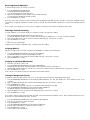
Sending Program, Bank LSB and Bank MSB data is done via the M-Audio O2. Simply press the ADVANCED FUNCTION button followed by the
PROGRAM, DATA LSB or DATA MSB key, then enter the Program or Bank Change desired.
RPN/NRPNs Explained
Non-registered parameter numbers (NRPN’s) are device-specific messages that enable the control of synths via MIDI. The MIDI specification
defines parameter numbers to allow room for manufacturers to specify their own controllers. The more common of these have been
registered by the MIDI Manufacturer’s Association and are part of the MIDI specification (hence the term Registered Parameter Numbers
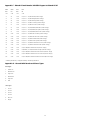
– RPN’s). (See Appendix F for additional information.)
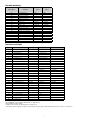
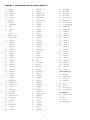
MIDI controllers 98 and 99 represent the NRPN LSB and MSB respectively, while 100 and 101 represent the RPN LSB and MSB. This can be seen
in the MIDI controllers list in Appendix D. To transmit an NRPN/RPN, these two controller messages are sent along with their user-specified
values. An additional controller message and value needs to be sent to specify the (coarse or fine) value adjustment. This is specified by
controller number 6 (Data Entry) for coarse adjustments or number 38 for fine adjustments.
Devices that receive NRPN messages will list NRPNs in the User Manual. It is essential that the NRPN MSB and LSB messages are sent together.
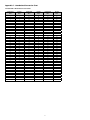
Both will be specified in the device’s manual, but oftentimes only in Hexadecimal format. If this is the case, you may refer to Appendix C for
help translating the value to Decimal.
The M-Audio O2 keyboard greatly simplifies the process of transmitting NRPNs. Enter the appropriate NRPN LSB by pressing the LSB/DATA
button twice, enter the NRPN MSB by pressing the MSB/DATA button twice, and as the controller is moved, an appropriate NRPN message
will be sent out. Assign NRPN Coarse to make big sweeps, or NRPN Fine to make slight adjustments.
10