1
Chapter 6 - Communications
ION7550 / ION7650 User Guide
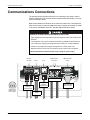
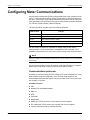
Communications Overview
ION7550 and ION7650 meters have numerous communication possibilities
depending on your ordering options. Both models have exactly the same
communications options available.
All of the communication ports can be used concurrently.
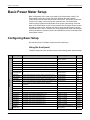
COM
Port
Available Connections
Standard/
Option
Description
1
Selectable RS-232/RS-485
port
Standard
COM1 can switch between RS-232 mode for a single direct connection
or RS-485 for multi-point serial connections. Both ports support the
following protocols:
ION, Factory, EtherGate, GPS, ModemGate, Modbus RTU, Modbus
Master and DNP 3.00.
2
Dedicated RS-485 port
Standard
COM2 provides an RS-485 serial port that supports the following
protocols: ION, GPS, EtherGate, ModemGate, Modbus RTU, DNP
3.00, Modbus Master and Factory.
3
Internal modem
Option
COM3 provides an optional internal modem.
The meter’s internal modem communicates to the server computer
over the telephone network.
4
Optical port
Standard
COM4 provides an ANSI Type 2 Optical port (located on the front of the
meter) that is used for serial communications, and supports the
following protocols: ION, Factory, Modbus RTU, or DNP 3.00
Ethernet
10BASE-T/100BASE-TX
and 100BASE-FX Ethernet
Option
The Ethernet port supports 10BASE-T/100BASE-TX and 100BASE-FX
(fiber) connections. You can communicate with your meter using SNMP
or FTP (for IEC 61850 and COMTRADE) via Ethernet.
Page 84
© 2010 Schneider Electric. All rights reserved.