1
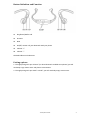
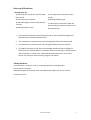
Bluetooth Pairing Your Thump with Your Phone Pairing introduces Bluetooth enabled devices to each other. The process creates a permanent and safe link between your Thump and your phone and provides you with quick service between the devices without using any password. 1. You must start by first setting your phone into Bluetooth discovery mode. For example, for an iPhone®, use the Settings > General > Bluetooth > On selection sequence. 2. Next, set your Thump to be discoverable: a. Start with your Thump turned off. That is, all LED lights are off. b. Press and hold the S4 key while your Thump goes through the following light displays. This will take around 8 seconds. i. Red and blue lights flash once accompanied by a single tone in your Thump. ii. Red light then flashes once. iii. Red and blue lights start flashing alternatively accompanied by a double tone in your Thump. Thump is now in discoverable and will stay so for a few minutes. c. Release the S4 key. 3. Momentarily, your phone shows “Z-W88” in its discovered devices list as not paired. Note, “Z-W88” is the internal manufacturing model designation for your Thump. 4. Select the “Z-W88” entry which will initiate pairing. Your phone may require you to enter a Pin-Code. For that, enter code 0000 to complete pairing successfully. (Note: 0000 is a default pairing Pin-Code.) 5. Your Thump pairing successfully completes with two single tones in your Thump and the lights will flash to indicate the status of the connection: If the red & blue lights flash slowly together, it indicates a successful connection with both a mono and stereo phone. If only the red light flashes slowly, it indicates a successful connection with just a mono phone. If only the blue light flashes slowly, it indicates a successful connection with just a stereo phone. Note: If your Thump cannot pair with your phone in 3 minutes, it will automatically shut off. If your Thump isn’t in pairing mode, your phone will not be able to find it. To ensure successful pairing, you must make sure both devices are in Bluetooth discovery mode at the same time. Thump User Guide 4