1
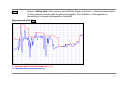
Software CompactConnect Installation Insert the installation CD into the according drive on your computer. If the autorun option is activated the installation wizard will start automatically. Otherwise please start setup.exe from the CD-ROM. Follow the instructions of the wizard until the installation is finished. Min. system requirements: Windows XP USB interface Hard disc with at least 30 MByte free space At least 128 MByte RAM CD-ROM drive The installation wizard will place a launch icon on the desktop and in the start menu: [Start]\Programs\CompactConnect. If you want to uninstall the software from your system please use the uninstall icon in the start menu. You will find a detailed software manual on the CD. Main Features: Graphic display for temperature trends and automatic data logging for analysis and documentation Complete sensor setup and remote controlling Adjustment of signal processing functions Programming of outputs and functional inputs optris CTlaser – E2011-08-A 55