1
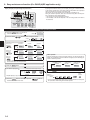
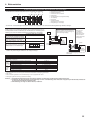
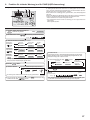
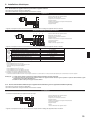
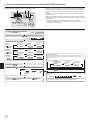
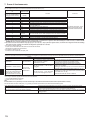
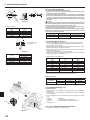
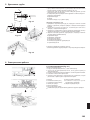
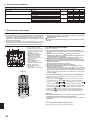
8. Easy maintenance function (For PUHZ-(H)RP application only)
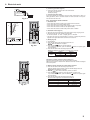
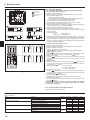
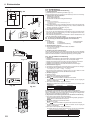
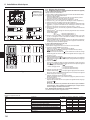
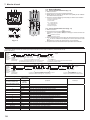
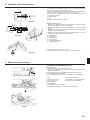
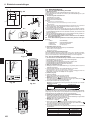
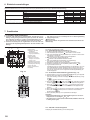
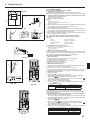
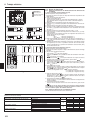
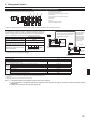
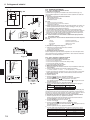
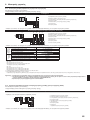
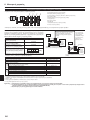
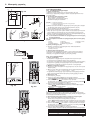
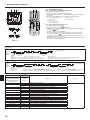
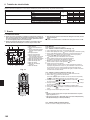
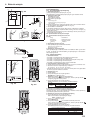
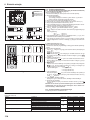
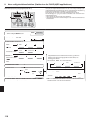
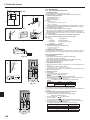
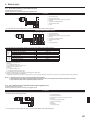
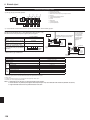
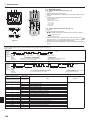
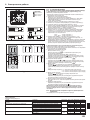
Display example (Comp discharge temperature 64˚C)
C
D
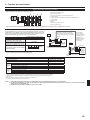
By using the maintenance mode, you can display many types of maintenance data
on the remote controller such as the heat exchanger temperature and compressor
current consumption for the indoor and outdoor units.
This function can be used whether the air conditioner is operating or not.
During air conditioner operation, data can be checked during either normal operation or maintenance mode stable operation.
* This function cannot be used during the test run.
* The availability of this function depends on the connecting outdoor unit. Refer to
the brochures.
B
A
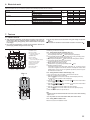
PAR-21MAA
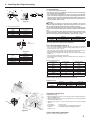
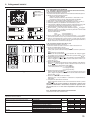
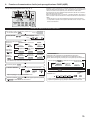
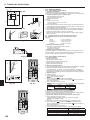
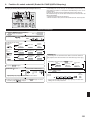
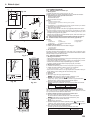
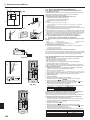
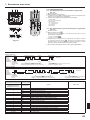
Maintenance mode operation procedures
(1) Press the TEST button for 3 seconds to
activate the maintenance mode.
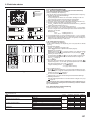
(2) Press the TEMP.
Display A MAINTENANCE
buttons to set the refrigerant address.
Display B
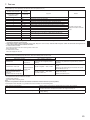
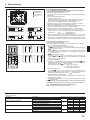
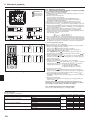
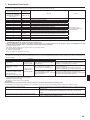
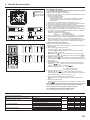
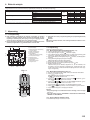
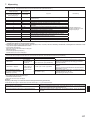
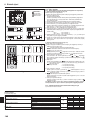
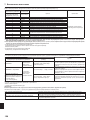
(3) Select the data you want to display.
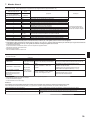
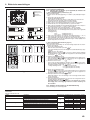
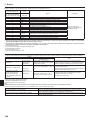
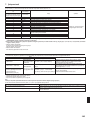
Cumulative
operation time
Compressor
information
MENU
Outdoor unit
information
Display A
Heat exchanger
temperature
Display A
ON/OFF
Indoor unit
information
COMP ON
x10 HOURS
OUTDOOR UNIT
H•EXC. TEMP
Indoor room
temperature
Display A
INDOOR UNIT
INLET TEMP
Operation
current
ON/OFF
number
COMP ON
x100 TIMES
COMP ON
CURRENT (A)
Comp discharge
temperature
OUTDOOR UNIT
OUTLET TEMP
Outdoor ambient
temperature
OUTDOOR UNIT
OUTDOOR TEMP
Heat exchanger
temperature
INDOOR UNIT
H•EXC. TEMP
Filter operation
time
INDOOR UNIT
FILTER USE H
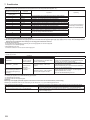
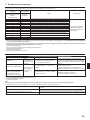
* The filter operation time displayed is the number of hours the filter has been
used since the filter reset was performed.
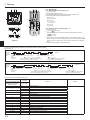
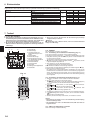
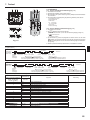
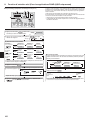
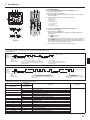
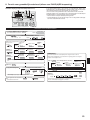
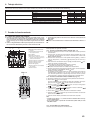
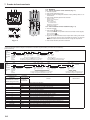
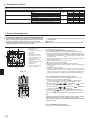
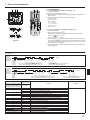
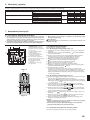
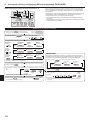
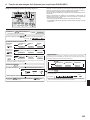
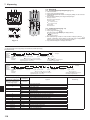
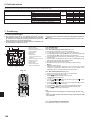
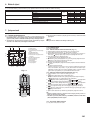
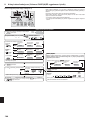
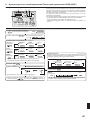
Stable operation
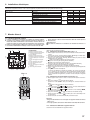
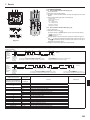
Using the maintenance mode, the operation frequency can be fixed and the operation can be stabilized. If the air conditioner is stopped, use the following procedure to start this operation.
Press the MODE button to select the operation mode.
Stable cooling
operation
(4) Press the FILTER button.
(5) The data is displayed in
C
Display A
.
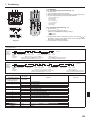
HEAT
STABLE MODE
Stable operation
cancellation
STABLE MODE
CANCEL
(Airflow temperature display example)
Blinking
Press the FILTER button.
Display C
Waiting for
response
Approx.
10 sec.
64
Display D
(6) Press the TEST button for 3 seconds or press the
deactivate the maintenance mode.
Stable
operation
Waiting for
stable operation
* Repeat steps (2) to (5) to check another data.
14
COOL
STABLE MODE
Stable heating
operation
ON/OFF button to
10-20 min.
* You can check the data using steps (3) to (5) of the maintenance mode operation procedures while waiting for the stable operation.