1
KNA-DV3200Inst(E)
03.5.8
2:41 PM
Page 7
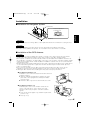
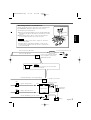
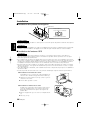
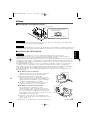
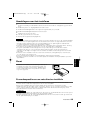
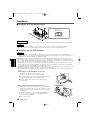
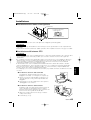
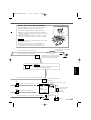
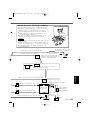
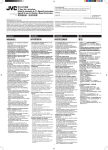
Attaching Remote Control Sensor
Backing paper
When using a TV monitor other than ones manufactured
by KENWOOD, attach the Remote Control Sensor
following the procedure below:
1
Double-sided
tape
English
2
Remove the backing paper from the double-sided tape
and attach the tape to the back of the Remote Control
Sensor.
After wiping off the dirt or oil from the attachment
location, attach the Remote Control Sensor.
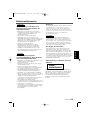
NOTE
• Wipe off the dirt or oil from the surface to which the
Sensor is attached.
• Avoid locations under direct sunlight or near the TV
monitor where signals from the remote controller are
not received easily.
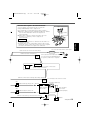
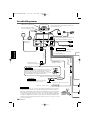
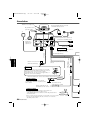
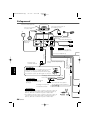
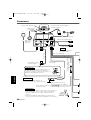
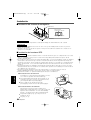
To reverse lamp harness of car
Reverse detection cable (Pink)
REVERSE
TEL mute cable (Brown)
TEL MUTE
Connect to the TEL mute terminal
for the navigation system of the
KENWOOD car audio.
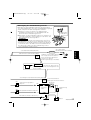
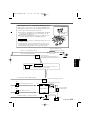
NOTE
If no connections are made, do not let the cable
come out from the tab.
Automatic illumination control cable (Orange)
To car light control switch
ILLUMI
(3A)
Ignition key switch
Ignition cable (Red) 12 V
ACC
Car fuse box
(5A)
Car fuse box
(Main fuse)
Battery cable (Yellow) 12 V
Ground cable (Black) - (To car chassis)
Battery
English-7