1
Operating Instruction
95980776
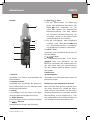
Structure
10
9
8
7
6
1
2
3
4
5
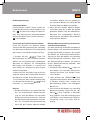
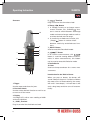
1. Trigger
Used to open and close the jaws.
2. Function Switch
Used to select desired function as well as to
turn on or off the meter.
3. Display
3 3/4-digit LCD, with a max. reading of 3999
and unit indication.
4. „ COM „ Terminal
Plug-in terminal for the black test Iead.
23
5. „
“ Terminal
Plug-in terminal for the red test Iead.
6.“Range / „ Button
1. ln voltage, current, or resistance measurement function, this „RANGE/
“ button is used to switch between autorange
mode and manual range mode as well as
to select desired manual range.
2. ln continuity or diode test function, this
„Range/
button is used to switch
between continuity and diode test functions.
7. „HOLD“ Button
Used to enter/exit Data Hold mode.
8. „
“ Button
ln dc current measurements, this
button is used for zaroing before measurement. ln other measurements, this button
can be used to enter/exit Relative mode.
9. Tactila Barrier
10. Jaws
Used to clamp oonductor for current measurements.
lntroduction for the Built-in Buzzer
When you press a button, the buzzar will
sound a beep if the press is effective. Before
the meter turns off automatically, the meterwill emit 5 short beeps, 1 minute later it will
emit a long beep end then turn off automatically.