1
Handmessgerät XA1000
Hand held device XA1000
Description of screen elements
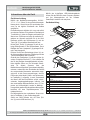
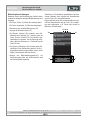
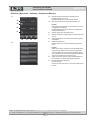
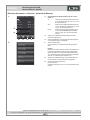
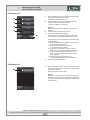
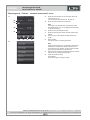
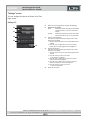
When using the device, take special note of the following important operating elements and displays:
• The "Back" key (2) opens the previous menu.
• The "Main menu" key (6) opens the main menu.
• Name of the current screen (26)
MANUAL
All options which can be selected via touch function
can also be selected by using the cross control and
the "OK" key.
For safety reasons, some options can only be selected
and configured by using the cross control and the
"OK" key (e.g. date and time in the "Settings" screen).
27 28 29
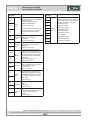
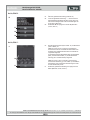
• Display of the current time (27)
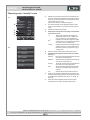
• The "Padlock" symbol (28) appears when you
press and hold the "On/Off" key for approx. 1 second during a measurement. The touch function of
the colour display is locked. To release the lock,
press and hold the "On/Off" key for
approx. 1 second.
26
30
6
2
• The "Lightbulb" symbol (29) appears when you
have used the "Illumination on/off" key to switch
on background illumination (see chapter "Information about th e device").
• Battery loading status indicator (30); a plug symbol
is shown when power is supplied via a USB connection.
DRUCK & TEMPERATUR Leitenberger GmbH • Bahnhofstr. 33 • D-72138 Kirchentellinsfurt • GERMANY
Tel. +49 (0) 7121-90920-0 • Fax +49 (0) 7121-90920-99 • DT-Info@Leitenberger.de • www.druck-temperatur.de • www.LR-Cal.net
41