1
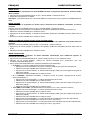
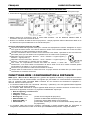
ENGLISH OPERATION MANUAL Always use an appropriate and certified safety cable when installing the unit. In order to prevent electric shock, do not open the cover. Apart from the mains fuse there are no user serviceable parts inside. Never repair a fuse or bypass the fuse holder. Always replace a damaged fuse with a fuse of the same type and electrical specifications! In the event of serious operating problems, stop using the fixture and contact your dealer immediately. The housing and the lenses must be replaced if they are visibly damaged. Please use the original packing when the device is to be transported. Due to safety reasons it is prohibited to make unauthorized modifications to the unit. Important: Never look directly into the light source! Don’t use the effect in the presence of persons suffering from epilepsy. DESCRIPTION: ® 1. MAINS INPUT: equipped with original Neutrik PowerCON . Connect the supplied mains cable or any ® PowerCon extension cable here. 2. MAINS OUTPUT: used to daisy chain the power to several other projectors. Always pay attention to the ® maximum load while adding projectors! Special Multi cables (PowerCON + DMX XLR-cables are optionally available: see our website!) 3. MAINS FUSE: protects the unit in case of electrical problems, always use the prescribed fuse! 4. DMX IN/OUT: both 3pin and 5pin in/outputs are available to daisy chain the projector with other units that will be controlled by a DMX-controller. 5. MODE Button: used to browse the different options of the setup menu, also the UP/DOWN-buttons (7) can be used to browse the setup menu in both directions. BRITEQ® 3/83 POWERMATRIX5x5-RGB