1
Serial Port Settings
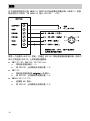
RDP100 and the measuring instrument communicate on the RS-485 line using a
Vaisala proprietary protocol. There must be only one RDP100 and one
compatible instrument on the RS-485 line - no other devices. The serial port
settings of the connected measuring instrument must be:
n
19200 bits per second
n
8 data bits
n
no parity bit
n
one stop bit
The required settings are the factory default settings for all of the compatible
instruments. However, if you have changed the serial port settings, you must
change them back to 19200-8-N-1 before RDP100 can read the instrument.
There are no requirements for the serial port operating mode (for example,
STOP mode), address, or measurement message format of the measuring
instrument.
Power Supply and Wiring Considerations
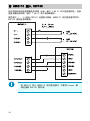
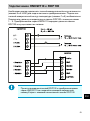
RDP100 requires a regulated 12 ... 28 VDC supply voltage. To simplify the
wiring and avoid ground loops, use only a single power supply to power both the
RDP100 and the measurement instrument. The recommended wiring
arrangement depends on the instrument that is connected:
n
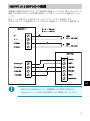
HMDW110 series transmitters are designed to supply operating power to
the RDP100. For wiring instructions, see section Wiring HMDW110 with
RDP100 on page 12.
n
The rest of the supported instruments should be powered through the
RDP100. For wiring instructions, see section Wiring on page 10.
2