1
Step 9
Step 10
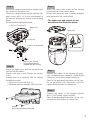
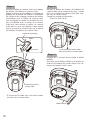
Mount the camera body onto the camera
mount bracket.
Align the lock plate with the guide of the camera mount bracket, engage the bracket with
the camera body while aligning the center of
the bracket with the center of the camera, and
rotate the camera body clockwise while pressing the camera to the camera mount bracket.
Secure the camera mount bracket to the camera with 1 piece of the camera fixing screw
(M3, supplied with the camera).
Recommended tightening torque:
0.68 N·m {0.51 lbf·ft}
Lock plate
Guide
Approx. 20 °
Camera fixing screw
(M3, supplied with the camera)
Step 11
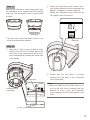
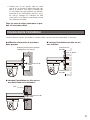
Engage the 5 hooks to mount the lower case.
Ensure the lower case and the camera mount
bracket are steadily fit with each other.
Base part of the camera
*B
e sure to mount it with holding the base part
of the camera.
Lower case
8