1
INSTALLATION MANUEL
GALEO
Illuminated Weatherproof Keypad with remote electronics
2. Press A5 to modify the master code.
One beep is emitted. Enter the new 4 or 5 digit
master code. One beep is emitted to confirm that
the master code is programmed.
3. Press B to exit from the programming mode.
2 beeps are emitted to confirm that the keypad
is in stand-by operating mode.
D. ADDING, CHANGING
OR DELETING A USER CODE
Group 1: From address 00 to address 99,
relay output 1
1. Enter the master code twice
(1 2 3 4 5 default value master code).
2 beeps are emitted to confirm entry
in programming mode.
2. To add a user code, enter the user location
(from 00 to 99).
If the user location is free 1 beep is emitted,
enter the 4 or 5-digit User code.
3. To Change a User code enter the user
location.
4 beeps are emitted to indicate that user location
is already programmed. Enter a new 4 or 5-digit
code. A beep is emitted to confirm the new
user code.
4. To delete a User code enter the user
location.
4 beeps are emitted. Press 0 0 0 0 0 in 5-digit
length code or 0 0 0 0 in 4-digit length code.
A beep is emitted to confirm the new user code.
default value master code). 2 beeps are emitted
to confirm entry in programming mode.
2. Press A0 to program the key-in keypad
time and the keys lit time.
1 beep is emitted. Enter the time in 10th
of second – 10 for 10 seconds up to 99
for 99 seconds the backlighting dims 10 seconds
after the last keypress or switches off after entering a valid code. Press 00 for permanent illumination keys. One beep is emitted to validate the time.
3. Press A1 to program relay 1
output time (door release time).
1 beep is emitted. For a latched output enter the
time in seconds – 01 for 1 second up to 99 for 99
seconds. Press 00 for a toggled output. One beep
is emitted to validate the time.
4. Press B to exit from programming mode.
2 beeps are emitted to confirm that the keypad
is in stand-by operating mode.
4 beeps indicate a data computing error.
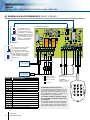
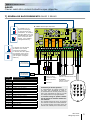
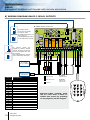
F. RESET MASTER CODE
On stand-by operating mode, put a jumper
on P2.
Wait 1 second and then remove the jumper. One
beep is emitted. The master code is restored
to its default value 1 2 3 4 5 in 5-digit
code and 1 2 3 4 in 4-digit code.
G. CHANGING THE CODE BY A USER
NOTE: If the Pin code is already programmed
or is identical to the master code, then 4 beeps
are emitted. Press B to exit from the programming
mode. 2 beeps are emitted to confirm that
the keypad is in stand-by operating mode.
E. TIME OUTPUTS
This section allows to program the illumination time and the Relay activation time.
1. Enter the master code twice (1 2 3 4 5
18
cdvi.com
cdvigroup.com
To authorize a user to modify its own
User code put a jumper on P3 (to disable the
feature remove the jumper).
1. Enter the old user code.
The relay is activated and a beep is emitted.
2. Enter the 2-digit sub master code (default
sub master code A and B).
A beep is emitted to authorise the modification.
3. Enter the new user code.
2 beeps are emitted to confirm the new code.