1
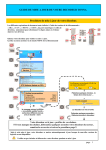
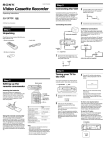
Changement de la station
pour la fonction Auto Clock
Set
MENU
> /. /? //
1
Appuyez sur MENU et puis sur > /.
pour sélectionner REGLAGES et appuyez
ensuite sur OK.
MENU
PAUSE
RET
LECTURE
Préparation
OK
REGLAGES
OPTIONS
SYNTONISEUR
SHOWVIEW
HORLOGE
LANGUE
SELECTIONNER : V v
REGLER
: OK
AV
OK
STOP
2
RET
Appuyez sur > /. pour sélectionner
HORLOGE et appuyez ensuite sur OK.
PAUSE
LECTURE
AV
OK
Le curseur ( ) se trouve sur REGLAGE
AUTO.
RET
Appuyez sur / pour sélectionner OUI.
PAUSE
LECTURE
1.
1. 1998
JE
0 : 00
REGLAGE AUTO
PROG HORLOGE
[NON]
[ 1 ]
SELECTIONNER : V v
REGLER
: Bb
FIN
: OK
STOP
3
tHORLOGE
AV
tHORLOGE
11. 12. 1998
VE
15 : 30
OK
REGLAGE AUTO
PROG HORLOGE
STOP
[ OU I ]
[ 1 ]
SELECTIONNER : V v
REGLER
: Bb
FIN
: OK
suite page suivante
Préparation
17