1
9.22.14
STUDI SYNC
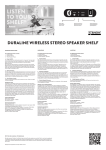
Status Light
Pairing Button (Power)
TM
USB Charging Port
6.5 ft. Micro USB
Charging Cable
Control Panel
IMPORTANT!
•
•
•
•
READ ALL INSTRUCTION BEFORE INSTALLING SHELF
MUST CHARGE SPEAKER SHELF FOR 30 MINUTES BEFORE CONNECTING TO YOUR BLUETOOTH® ENABLED DEVICE
ONE SCREW MUST GO INTO WALL STUD TO KEEP SHELF SECURELY FASTENED TO WALL
ALL SCREWS MUST BE USED TO INSTALL PROPERLY
*See separate instructions for mounting shelf
Welcome to the world of StudioSync™, we know you’re excited to use the StudioSync™ Music Shelf and want you to have an
excellent Bluetooth® connectivity experience.
Please follow these instructions carefully to connect your device to the shelf’s Bluetooth®. Use your device owner’s manual if
you need to troubleshoot your Bluetooth® set.
How to pair your device to the Music Shelf’s Bluetooth® for the first time:
•
•
•
•
•
•
T o turn on the shelf and Bluetooth® connection, press and hold the pair button for 3 seconds, you will hear a tone.
Only one device can be paired with the Music Shelf at a time.
The Status Light will turn blue and flash during the connection
Turn on your Bluetooth® device and search for XS008 to pair.
When the connection is made you will hear a tone.
Now you’re all set to enjoy your music.
Volume adjustment
•
•
Your device controls and adjusts the volume of the Music Shelf.
Be careful not to play high bass sounds that could damage the speakers.
How to turn off the Music Shelf’s device
•
•
•
•
T o disconnect the Music Shelf’s Bluetooth® connection, press and hold the power button for 3 seconds.
You may connect another device at this time. To turn off the Music Shelf, press and hold the button for 6 seconds. You will hear a tone and the light will turn off.
Hibernation mode, powers off after 25 minutes of Bluetooth® disconnection.
Charging the rechargeable battery is easy!
The built-in battery lasts for 24 hours of play time. When the battery needs charging a warning will sound and status light
will flash red. How to Charge the rechargeable battery
•
•
•
•
•
Connect the USB cord to the micro/USB slot; make sure they are aligned precisely for proper connection.
T he USB Charging cable (included) can connect to any standard USB charger (5V/1A) station, laptop or desktop
or with a wall plug adapter (not provided).
Recommended charging time is 8 hours for a full charge
Music will continue to play during recharging
The status light turns red when battery is being charged, when fully charged the red light will turn off.
For more information please visit: www.mystudiosync.com
Includes a 90 day manufacturer limited warranty. TM
(not included)
I N N O VA T O R S F O R L I F E ™
9.22.14
STUDI SYNC
TM
Luz indicadora de estado
Botón de emparejmiento
(encendido)
Puerto USB de carga
2 m El cable
de carga USB
Panel de control
IMPORTANTE!
• LEE TODAS LAS INSTRUCCIONES ANTES DE INSTALAR LA REPISA
• EBES CARGAR LA REPISA CON SPEAKERS DURANTE 30 MINUTOS ANTES DE CONECTARLA A TU DISPOSITIVO HA
BILITADO PARA BLUETOOTH
• UN TORNILLO DEBE INSTALARSE DIRECTAMENTE EN LA VIGA DE PARED PARA MANTENER LA REPISA ASEGURADA
A LA PARED
• TODOS LOS TORNILLOS DEBEN USARSE PARA INSTALAR CORRECTAMENTE
*Ver las instrucciones separadas para instalar la repisa
Bienvenido al mundo de StudioSync™,sabemos que está entusiasmado por usar la repisa con speakers StudioSync™ y
queremos que tenga una excelente experiencia de conexión mediante Bluetooth®.
Sigue estas instrucciones detenidamente para conectar tu dispositivo al Bluetooth® de la repisa. Usa el manual del usuario
de tu dispositivo si necesitas solucionar problemas de tu Bluetooth®.
Cómo emparejar tu dispositivo al Bluetooth® de la repisa con speakers por primera vez:
•
•
•
•
•
•
Para encender la repisa y la conexión de Bluetooth®, mantén oprimido el botón de emparejamiento durante 3 segundos, y escucharás un tono.
Sólo un dispositivo puede emparejarse a la vez con la repisa con speakers.
La luz indicadora de estado se pondrá azul y parpadeará durante la conexión
Enciende tu dispositivo con Bluetooth® y busca XS008 para emparejar.
Cuando la conexión se realiza, escucharás un tono.
Ya puedes disfrutar de tu música.
Ajuste de volumen
•
•
Tu dispositivo controla y ajusta el volumen de la repisa con speakers.
Asegúrate de no reproducir a alto volumen sonidos con bajo que pudieran dañar los speakers.
Cómo desconectar el dispositivo de la repisa con speakers
•
•
•
•
Para desconectar la conexión de Bluetooth® de la repisa con speakers, mantén oprimido el botón de encendi do durante 3 segundos.
Puedes conectar otro dispositivo en este momento. Para apagar repisa con speakers, mantén presionado el botón durante 6 segundos. Escucharás un tono y la luz indicadora se apagará.
Modo de inactividad: se apaga después de 25 minutos de desconexión del Bluetooth®. Il est facile de charger la pile rechargeable!
¡Cargar la batería recargable es fácil!
La batería integrada dura 24 horas de reproducción. Cuando la batería necesita recargarse, se escuchará un sonido de
advertencia y la luz indicadora de estado parpadeará en rojo. Cómo cargar la batería recargable
•
•
•
•
•
Conecta el cable USB a la ranura micro/USB; asegúrate de que estén alineadas con presición para una
conexión adecuada.
El cable de carga USB (se incluye) puede conectarse a cualquier estación de carga USB estándar (5V/1A),
laptop, o computadora de escritorio, con un adaptador de enchufe de pared (no se incluye).
El tiempo de carga recomendado es de 8 horas para una carga completa
La música seguirá reproduciéndose durante el proceso de carga
La luz indicadora de estado se pone roja cuando la batería está cargando; cuando esté completamente car
gada la luz roja se apagará.
Si deseas obtener más información, visita www.mystudiosync.com
TM
Incluye un fabricante de garantía limitada de 90 días.
(no incluido)
I N N O VA T O R S F O R L I F E ™
9.22.14
STUDI SYNC
TM
Voyant de fonctionnement
Bouton de connexion
(mise sous tension)
Port de charge USB
2 m Le câble
de recharge USB
Panneau de commande
IMPORTANT!
• LISEZ TOUTES LES INSTRUCTIONS AVANT DE PROCÉDER À L’INSTALLATION DE L’ÉTAGÈRE
• L’ÉTAGÈRE À HAUT-PARLEUR DOIT ÊTRE CHARGÉE PENDANT 30 MINUTES AVANT TOUTE CONNEXION À VOTRE APPAREIL COMPATIBLE À BLUETOOTH®
• UNE VIS DOIT PÉNÉTRER DANS LE MONTANT MURAL POUR GARDER L’ÉTAGÈRE SOLIDEMENT FIXÉE AU MUR
• IL FAUT UTILISER TOUTES LES VIS POUR UNE INSTALLATION CORRECTE
*Consultez les instructions séparées d’installation de l’étagère
Bienvenue au monde de StudioSync™ nous réalisons que vous avez hâte d’utiliser l’étagère à musique StudioSync™ et
souhaitons vous offrir une excellente expérience de connectivité Bluetooth®.
Veuillez suivre ces instructions avec soin pour connecter votre appareil à Bluetooth® de l’étagère. Utilisez le guide
d’instructions de votre appareil si vous avez besoin d’un dépannage de votre ensemble Bluetooth®.
Comment connecter votre appareil à Bluetooth® de l’étagère à musique pour la première fois :
•
•
•
•
•
•
our allumer l’étagère et la connexion Bluetooth®, maintenez le bouton de connexion appuyé pendant 3
P
secondes, vous entendrez un signal sonore.
Un seul appareil peut être connecté à l’étagère à musique à la fois.
Le voyant de fonctionnement passera au bleu et clignotera pendant la connexion
Mettez votre appareil Bluetooth® en marche et cherchez XS008 pour connecter.
Une fois que la connexion est effectuée, vous entendrez un signal sonore.
Vous pouvez maintenant profiter de votre musique.
Réglage du volume
•
•
Votre appareil contrôle et règle le volume de l’étagère à musique.
Veillez à ne pas jouer fort les sons graves qui pourraient endommager les enceintes.
Comment éteindre l’appareil de l’étagère à musique
•
•
•
•
Pour déconnecter Bluetooth® de l’étagère à musique, maintenez le bouton de mise sous tension appuyé pen
dant 3 secondes.
Vous pouvez maintenant connecter un autre appareil. Pour éteindre l’étagère à musique, maintenez le bouton appuyé pendant 6 secondes. Vous entendrez un signal sonore et le voyant s’éteindra.
Mode hibernation; s’éteint si Bluetooth® est déconnecté pendant plus de 25 minutes.
Il est facile de charger la pile rechargeable!
La pile incorporée fournit une durée de charge de 24 heures. Lorsque la pile a besoin d’être rechargée, un signal d’
avertissement sonnera et le voyant de fonctionnement clignotera au rouge. Comment charger la pile rechargeable
•
•
•
•
•
Connectez le cordon USB à la fente micro/USB; assurez-vous qu’ils sont exactement alignés pour assurer une bonne connexion.
Le câble de recharge USB (fourni) peut se connecter à n’importe quel poste de recharge USB (5 volts/1
ampère), ordinateur portatif ou de bureau standards ou avec un adaptateur de fiche
murale (non fourni).
La durée de recharge recommandée est de 8 heures pour une recharge complète
La musique continuera de jouer pendant la recharge
Le voyant lumineux de fonctionnement devient rouge pendant la charge de la pile ; ce voyant rouge s’éteint une fois la pile complètement chargée.
Pour en apprendre davantage, veuillez visiter: www.mystudiosync.com
TM
Comprend une garantie limitée du fabricant de 90 jours.
(non inclus)
I N N O VA T O R S F O R L I F E ™
9.22.14