1
Alternative Connections
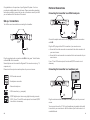
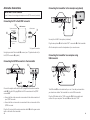
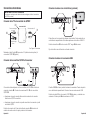
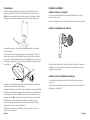
Connecting the transmitter to the microphone (optional)
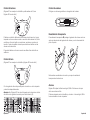
IMPORTANT: S/PDIF converter
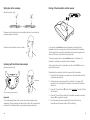
If your TV does not have analog audio outputs, use the S/PDIF converter (included).
Connecting the TV to the S/PDIF converter
30
S/PDIF converter
Digital coaxial cable
L/R audio cable
(not included)
29
26
31
32
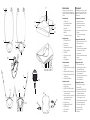
Use only the A-4967-0 microphone (included).
Digital optical cable
Plug the microphone 32 into the black “MIC” connection 26 of the transmitter.
(Toslink)
From TV
To Digimax RF transmitter
Using the provided Toslink cable 29, connect your TV (optical audio out) to
the S/PDIF converter 30 (optical).
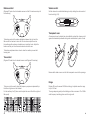
Connecting the S/PDIF converter to the transmitter
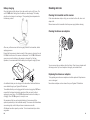
Affix the microphone over the loudspeaker of your sound source.
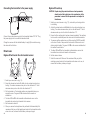
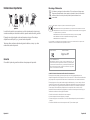
Connecting the transmitter to a computer using
USB connector
30
DC 12V
L
USB
AUDIO
USB
MIC
R
CONNECT
AUDIO
MIC
24
23
28
31
Connect the adapter cable with the RCA plugs 31 to the audio connection
cable 28. Plug the RCA plugs 31 into the RCA connections of the S/PDIF
converter 30.
• Ensure that the white connection is connected to the white connection of
your S/PDIF converter.
33
The USB cable 33 is not included with your unit. It can be purchased from
your electronics retailer. The transmitter has a mini USB connection.
Plug the USB cable into the “USB” connection 23 of the transmitter and
connect it to your computer. The switch 24 must be set to “USB”.
• Ensure that the red connection is connected to the red connection of the
S/PDIF converter.
Plug the 3.5 mm jack of the audio connection cable 28 into the green audio
input on the back of the transmitter.
12
13