1
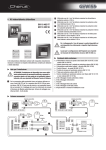
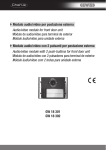
INSTALLATION INSTRUCTIONS ` The resident's name From the video entryphone you can insert or modify the name (name 1 and name 2) of the person living in the apartment. These names are visualised in the Call module with electronic index for front door unit (GW 18 322), if this is present in the system. The two names are stored directly in the electronic index, so if an apartment has more than one video entryphone you only need to apply this procedure to one of them and the two names will appear on all the others as well. If the system includes several electronic indexes, they will all be updated simultaneously. To insert or modify a name, proceed as follows: 18/01/2010 12:00 On the main menu page, use the and keys to select SETTINGS, then confirm the selection with ENTER. 12:00 On the settings page, use the and keys to select RESIDENT NAME, then confirm the selection with ENTER. INTERCOM CALL CAMERA VIEW VIDEO MAIL PRIVACY CALL TRANSFER AUXILIARY SERVICES BABY MONITOR FUNCTION HANDS FREE FUNCTION BUSINESS OFFICE FUNCTION ESC ENTER 18/01/2010 APARTMENT NUMBER RESIDENT NAME VOLUME/AUDIO SETTINGS DATE/TIME SETTINGS FDU DOOR STATUS LANGUAGE LCD POWER OFF TIMEOUT CUSTOMIZE ITEMS LEARNING MODE ESC ENTER 138