1
SERVSWITCH™ BRAND MATRIX VIDEO SWITCH
4. Operation
4.1 The Switch’s LEDs
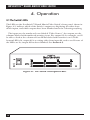
The LEDs on the ServSwitch™ Brand Matrix Video Switch’s front panel, shown in
Figure 4-1, indicate which of the Switch’s outputs are displaying the video from
which inputs, and which outputs have been blanked and aren’t showing anything.
The inputs are the numbered rows labeled “Video Source”; the outputs are the
columns labeled with numbered monitor icons. For output #2, for example, you’ll
be able to look at the column of four LEDs labeled with monitor icon 2: If the
bottom LED is lit, output #2 is receiving video from input #4, and so on. If none of
the LEDs are lit, output #2 has been blanked. See Section 4.2.
Figure 4-1. The Switch’s front-panel LEDs.
12