1
0382E.PROD NEW.fm Page 10 Tuesday, February 27, 2001 2:16 PM
INSTALLATION
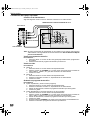
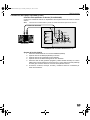
Digital TV - Set-Top Box (DTV-STB) Connection or DVD Player Connection
(some models)
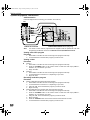
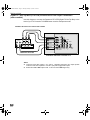
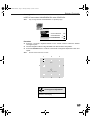
Use this diagram to connect the Panasonic DTV-STB (Digital TV-Set-Top Box) to the
back of your TV. Press the TV/VIDEO button to select Component mode.
TERMINAL ON BACK OF DTV-STB OR DVD PLAYERS
Y
R-AUDIO-L
Y
PB
ANT 1
PR
VIDEO
PB
S-VIDEO
VIDEO
PR
SPLIT
OUT
R-AUDIO-L
VIDEO
SVIDEO
NTSC OUTPUT
DIGITAL OUTPUT
L
AUDIO
ANT 2
R
COMPONENT INPUT INPUT
2
VIDEO INPUT
1
TO AUDIO
AMP
CABLES NOT SUPPLIED
COMPONENT VIDEO INPUT ON BACK OF TV
Notes:
r There are three video inputs, Y, PB, and PR. Separate component color inputs provide
luminance and color separation. Use the L (left) and R (right) audio inputs.
r Select DTV-STB to 480i output mode. TV set can receive 480i signal only.
10