1
Alarm Mode
Selecting an Alarm
This mode allows you to set up to five alarms to alert you at a preset
time. When an alarm is ON, the alarm clock icon appears in the Time
of Day display. Alarms can be set to sound every day, on weekdays
or weekends only, or one time only (for an appointment, for example).
When the day and time of an alarm are reached, the alarm tone
sounds, INDIGLO® night-light flashes, and the alarm entry is displayed for 20 seconds. You can silence the alarm by pressing any
button. If you don’t silence the alarm before the alert finishes, a
backup alarm is set to produce one more alarm in five minutes.
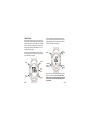
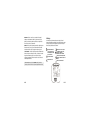
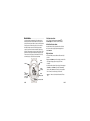
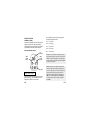
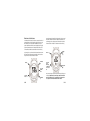
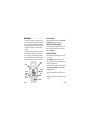
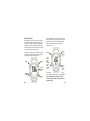
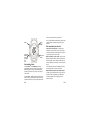
INDIGLO
Next
Alarm
Push to set
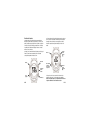
When viewing an Alarm setting, press DISPLAY (¶ ) or STOP/
RESET (Ä) to navigate through the five different Alarm settings.
Arming/Disarming an Alarm
While an Alarm setting is displayed, it can be turned on (“armed”)
or off (“disarmed”) without entering the setting state by pressing
and releasing the START/SPLIT button.
Setting an Alarm
1. Select the Alarm setting you wish to modify as described in the
previous section.
2. Press SET/FORMAT to enter the setting state. The watch will
display a brief setting reminder and then proceed to setting the
selected Alarm.
3. The first data to set is the Alarm type, which will be flashing.
Press DISPLAY (+) or STOP/RESET (–) to choose either WEEKDAYS, WEEKENDS, ONCE, or DAILY:
• DAILY – The Alarm will occur every day at the selected time.
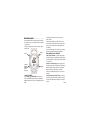
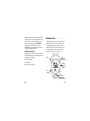
To Configure/
Hold to
go to Time
of Day
Previous
Alarm
• WEEKDAYS – The Alarm will occur at the selected time
Monday through Friday.
Alarm ON/OFF
1-40
1-41