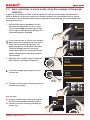
1
Menu mode
7.
Menu mode
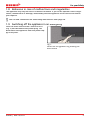
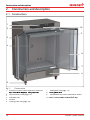
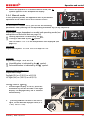
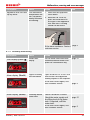
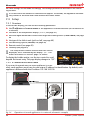
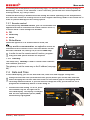
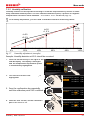
In menu mode, you can make basic settings, load programmes and export protocols, as well
as adjust appliance parameters.
Hauptschalter
Caution:
Before changing menu settings, read the description of the respective functions on the following pages to avoid possible damage to the appliance and/or chamber load.
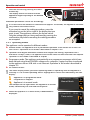
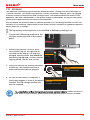
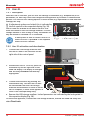
To enter menu mode, press the MENU key.
To exit the menu mode at any time, press
the
344
.4 °CMENU key
40 %
again. The appliance then returns to manual mode. Only
changes accepted by pressing the confirmation key are
0%
02 10
saved.
TEMP
FLAP
Set 444.4 °C
FAN
TIMER
d
h
End 29 Sept. 22 24
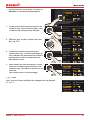
7.1 Overview
UF 110 PLUS
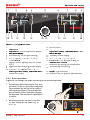
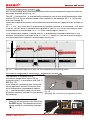
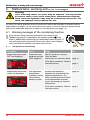
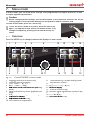
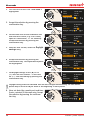
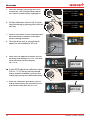
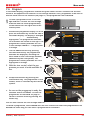
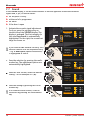
Press the MENU key to change between the displays in menu mode:
ON
O
N
1
2
3
4
PROGRAM
TEMP LANGUAGE
344.4 °C
TIME
FLAPSIGNALTÖNE
SETUP
02 10
d
FAN
h
End 29 Sept. 22 24
12
13
USER ID
40 %
Set 444.4 °C
TIMER
5
14
>
PROTOCOL
Zu der Typenbezeichnung
gibt es momentan drei Entwurfsrichtungen,
ich kann Ihnen noch nicht sagen, ob Memmert hierzu schon eine Entscheidung
getroffen hat.
Die hier gezeigt Variante, ist die von uns empfohlene Richtung.
PROG
100 %
CALIB
LANGUAGE
0%
min
.4 °C
SETUP
PROTOCOL
Manu
ZEIT UNDSOUND
DATUM
ALARM
max
UFP444100
auto
44.Sept
15
USER ID
444.4 °C
+/- 0.0 K
CALIBRATION
UF 110 PLUS
ON
O
N
>
Zu der Typenbezeichnung gibt es momentan drei Entwurfsrichtungen,
ich kann Ihnen noch nicht sagen, ob Memmert hierzu schon eine Entscheidung
getroffen hat.
6
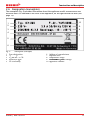
Fig. 23
1
2
3
4
5
7
8
9
10 11
17
18
19
ControlCOCKPIT in menu mode
Language selection activation key
Language selection display
Date and time display
Date and time setting activation key
Exit menu mode and return to operating
mode
6 Setup activation key (basic appliance settings)
7 Setup display (basic appliance settings)
8 Adjustment display
9 Adjustment activation key
10 Turn control for adjustment
42
16
11 Confirmation key (accepts setting made
with the turn control)
12 Programme setup activation key
13 Programme setup display
14 Protocol display
15 Protocol activation key
16 Acoustic signal adjustment activation key
17 Acoustic signal adjustment display
18 User ID display
19 User ID activation key
D30381 | Date 10/2014
m
4
au