1
15.0
Diagnosis Center
15.1
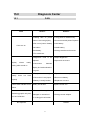
FAQ
Fault
Reason
Solution
1.Holding time on power
1. Long press on ON/OFF key.
button is not enough(>2s).
2.Connect external power/ Replace
2.Run out of power / battery
a new battery.
has broken.
3.Install battery.
3.No battery.
4.Change another environment.
Can't turn on
4.Too cold there.
Display
shows
nearly
1.Brightness need to be
1.Adjust brightness.
adjusted.
2.Open and reconnect.
2.Connection
between
nothing after turned on
display and motherboard is
not good.
Battery
does
not
work
properly
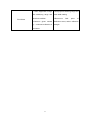
Power state indicator turns
1.Temperature is too high.
1.Try to decrease temperature.
2.Connection is not proper.
2.Reconnect battery.
3.Battery is nearly broken.
3.Replace a new one.
Battery has broken
Replace a new one
1.Connector loose,polluted,
1.Clean and reconnect.
damaged or unmatched.
2.Change a new adapter.
yellow
Measuring graphic only has
front end reflection
2.Locating pin has broken.
No response
Restart
73