1
DuraStation™
EV Charging Station
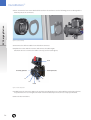
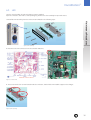
2. Then, unscrew the four screws that hold the socket in the enclosure. (See the following picture to distinguish the
different parts of the connector).
Figure 6: Socket assembly
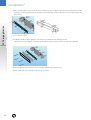
3. Disconnect the different cables from the broken connector.
4. Replace the socket with the new one and connect the cables again.
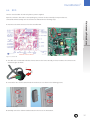
(Attention: Be sure to connect the cables correctly. See the below figure).
Lock
Proximity pilot (PP)
Control pilot (CP)
L1
N
L2
L3
Earth
Figure 7: Cables disposition
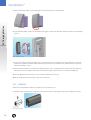
5. Finally fasten the connector again in the enclosure as indicated in step 2, and install the interlock as in the first
step. (Attention: Do not over-tighten. Consider recommended torques in section 3.3. Torque specification),
6. Close the door and lock it.
14