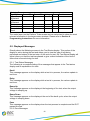
1
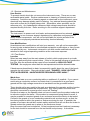
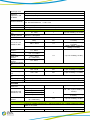
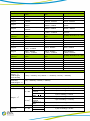
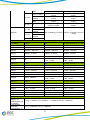
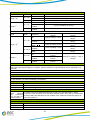
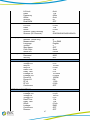
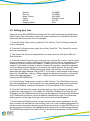
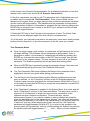
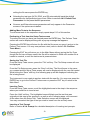
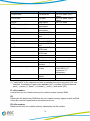
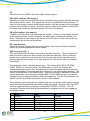
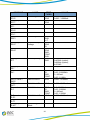
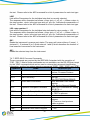
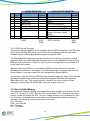
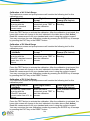
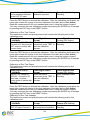
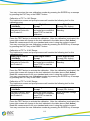
COMMAND
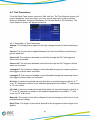
FSA nn,xxxx
DESCRIPTION
File Save-as
FN nn,xxxx
File New
SS nn
ADD <test,p1,p2,p3…>
Step Select
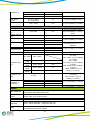
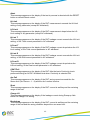
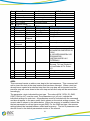
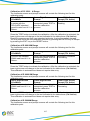
Adds all
parameters
Adds all
parameters
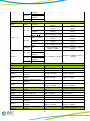
Step Add ACW test
Step Add DCW
test
Step Add IR test
Step Add GND test
Step Add CONT
test
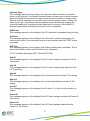
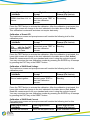
Step Add GND,
ACW tests
Step Add GND,
DCW tests
Step Add RUN test
Step Add TCT test
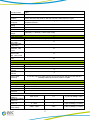
Step Delete
Step Delete by
Number
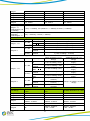
Step Prompt
Create
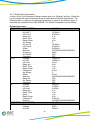
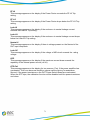
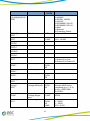
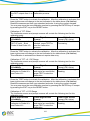
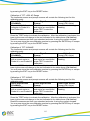
ADD2<test,p1,p2,p3…>
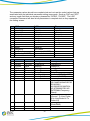
SAA
SAD
SAI
SAG
SAC
SAGA
SAGD
SAR
SAL
SD
SD nn
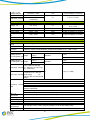
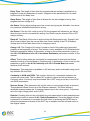
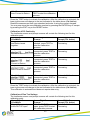
SP <prompt message>
SP
SF {1|0}
Step Prompt
Delete
Step Fail Stop
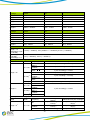
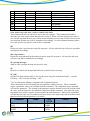
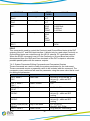
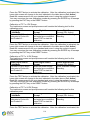
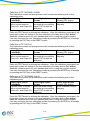
VALUE
nn = 01-9999, xxx =
name
nn = 01-9999, xxxx =
name
nn = 01-9999
Active selected Step
nn = 01-9999
prompt message =
Valid ASCII (1)
maximum 31
characters
1=On, 0=Off
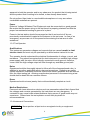
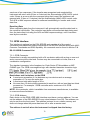
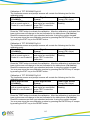
(1) "Valid ASCII" is the character set that is available from the front panel LCD user
interface. Consisting of upper case alphabet (A-Z), numbers (0-9) and decimal
point (.), asteric (*), dash (-), underbar (_), tilde (~) and space (SP).
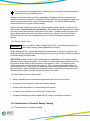
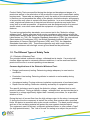
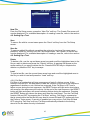
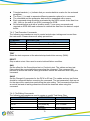
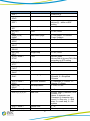
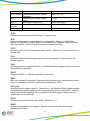
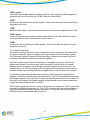
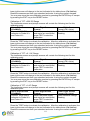
FL <file number>
Load a file from non-volatile memory into random access memory RAM.
FD
Deletes the file loaded into RAM from the non-volatile memory space as well as RAM.
A new file must be loaded before and tests can be run.
FD <file number>
Deletes a file from non-volatile memory indicated by the file number.
79