1
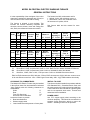
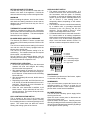
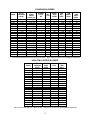
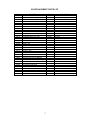
RETURN AIR AND FILTER RACK The filter rack may be mounted on either side, the bottom or the back of the appliance. Position the rack so that there is easy access to change the filter. HI/ECONO HEAT SWITCH This switch is provided on some models. It is located on the front of the furnace and provides the homeowner with the option of manually increasing or reducing the heating power of the furnace. It can be used to manually switch from "Hi" to "Econo" if less heating power is temporarily desired, depending on the outdoor temperature. This switch can also be controlled automatically by a suitable multi- or two-stage thermostat connected to the W1 (Econo) and W2 (Hi) terminals. Set the switch to "Econo" if a two stage or multi-stage thermostat is used. If a standard thermostat is connected across W1R, a remote switch or an outdoor temperature switch can be connected across OT-W2 to switch from "Econo" to "Hi" as the outdoor temperature drops. Leave the furnace switch in "Econo" if a remote or outdoor temperature switch is used. WARM AIR Before installing the plenum, look into the furnace and check the heating elements to ensure that no damage has occurred and that they are free of foreign material. THERMOSTAT and ANTICIPATOR Should be installed according to the instructions packed with it and connected to the 24 volt terminals on the front of the appliance. The heat anticipator should be set to 0.4 amps. BLOWER SPEED AND STATIC PRESSURE The Newmac EH Electric Furnace is tested and approved by CSA for static pressures of 0.20 to 0.50 ins wc. The 0.20 ins wc static pressure setting is for normal use and the units are factory equipped with the blowers set to provide this. The 0.50 ins wc static pressure setting is for air conditioning. The installer should set the required blower speed - see table below. Set the speed of the belt-drive-blower units by adjusting the motor pulley. Adjust this pulley to give the recommended air temperature rise. OT W2 W1 C G R 2 stage Heat/Cool Thermostat OT W2 W1 C Remote Switch (Optional) SEQUENCE OF OPERATION As the room temperature drops, the thermostat contacts will close and energize the heating element on the first sequencer. After approximately 20 seconds, the first set of contacts in the sequencer will close, bringing on the #1 element. At the same time the circulating blower will start. After approximately 40 seconds, the #2 element will come on. Depending on the model, and if the furnace is set to Hi, #3, #4, #5, and #6 elements will come on in sequence. See below for more information on the Hi/Econo switch setting. When the room thermostat is satisfied, it will break contact. All the elements will turn off in random sequence. The blower will stop when the last element shuts off. Heat/Cool Thermostat OT W2 W1 C Remote Switch (Optional) G R R = 24vac C = 24vac G = Fan Relay W1 = Heat Relay Stage 1 W2 = Heat Relay Stage 2 OT = (R) 24vac G R Heating Thermostat MAINTENANCE To maintain the performance of the furnace, replace or clean the air filter monthly. HOMEOWNER If you, the homeowner, suspect the furnace is not operating properly, or if there is no heat, do not tamper with the furnace. Have a qualified service person check out the furnace installation. BLOWER REMOVAL Turn off the main electricity power supply before servicing the furnace. Open the centre access panel to disconnect the wiring to the blower motor Open the blower access panel. Carefully unscrew the bolt(s) holding the blower assembly in place, and remove the entire blower/motor assembly by sliding it out through the access opening. HI/LO CONTINUOUS FAN SWITCH This is located on the front of the furnace and provides the homeowner with the option of having the circulating blower run continuously at high or low speed. This control does not affect the normal heating and cooling cycles of the furnace. 2