1
Energy Storage Module Indicators
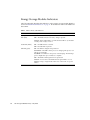
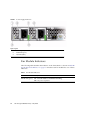
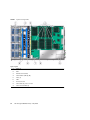
The following table describes the indicators on the energy storage module (ESM) as
shown in FIGURE: ESM Indicators on page 11. Note that each of the four ESMs have
these LEDs.
TABLE:
ESM Controls and Indicators
Name
Description
Ready to Remove
LED (blue)
On – The ESM can be safely serviced.
Off – The ESM cannot be serviced, a charge is present.
Caution - If the amber LED is on while the blue LED is on, the ESM
is faulty and is ready to remove.
Fault LED (amber)
On – An ESM fault has occurred.
Off – No ESM fault is present.
OK LED (green)
On – The ESM is charged and operational.
Slow blink – The ESM is in the process of charging. This process can
take up to 10 minutes.
Fast blink – The ESM is in the process of discharging. The discharge
process might take up to 5 minutes to complete.
Off – The ESM is discharged and non-operational.
Caution - Do not remove the ESM when the green LED is on or is
blinking. Doing so might result in data loss in the event of a power
failure.
10
Sun Storage F5100 Flash Array • May 2010