1
Optimizing the Image
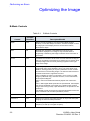
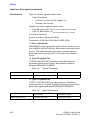
Table 2-1:
Control
Possible
Bioeffect
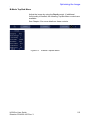
B-Mode Controls (Continued)
Description/Benefit
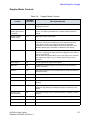
CrossXBeam
Yes
CrossXBeam is the process of combining three or more frames from
different steering angles into a single frame.
The combined single image has the benefits of reduced speckle
noise, reduced clutter, and continuity of specular reflectors.
Therefore, this technique can improve contrast resolution with
increased conspicuity of low contrast lesions, better detection of
calcifications, biopsy needle visualization, and cystic boundary
definition.
TGC
No
TGC amplifies returning signals to correct for the attenuation
caused by tissues at increasing depths. TGC slide pots are spaced
proportionately to the depth. The area each pot amplifies varies as
well. A TGC curve may appear on the display (if preset), matching
the controls that you have set (except during zoom). You can
choose to deactivate the TGC curve on the image.
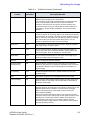
Scan Area
Yes
You can widen or narrow the size of the sector angle to maximize
the image's region of interest (ROI).
Tilt
Yes
You can steer the sector angle to get more information without
moving the probe while in B-Mode, M-Mode, Doppler Mode, and
Color Flow Mode. Tilt is not available on Linear probes.
Angle Steer
Yes
You can steer the PW Doppler or Color Flow sector angle to get
more information without moving the probe.
Reverse
No
Flips the image 180 degrees left/right.
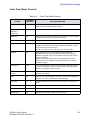
Dynamic Range
(Compression)
No
Dynamic Range controls how echo intensities are converted to
shades of gray, thereby increasing the adjustable range of contrast.
The Dynamic Range control name changes to Compression on
frozen images.
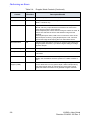
Line Density
Yes
Optimizes B-Mode frame rate or spatial resolution for the best
possible image.
Map
No
The system supplies B, M, and Doppler Mode system maps.
Frame Average
No
Temporal filter that averages frames together, thereby using more
pixels to make up one image. This has the effect of presenting a
smoother, softer image.
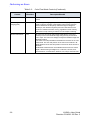
Colorize
No
Colorize is the colorization of a conventional B-Mode image or
Doppler Spectrum to enhance the user's ability to discern B, M, and
Doppler Mode intensity valuations. Colorize is NOT a Doppler
Mode. Colorizes the gray scale image to enhance the eye’s
discrimination capability.
Spectrum Colorize colorizes the spectrum as a function of power
using the inverse of the Colorize map for the signal intensity in each
Doppler line. Colorize enhances the visibility of the spectrum's
characteristics and enhances your ability to identify spectral
broadening and the edge contours of the spectrum used to define
the peak frequency/velocity.
LOGIQ e User Guide
Direction 5314626-100 Rev. 3
2-3