1
9. TROUBLESHOOTING
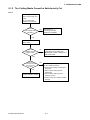
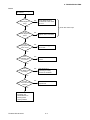
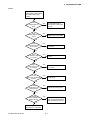
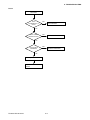
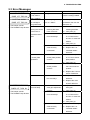
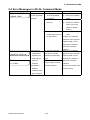
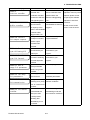
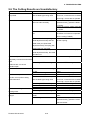
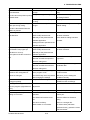
9.6 The Cutting Results are Unsatisfactory
Problem
The cut corners are rounded or
Cause
Solution
The cutter OFFSET is incompatible Adjust the cutter OFFSET value:
too pointed.
with the blade type being used.
* If too low, corners become rounded.
The blade mounted in the holder
* If too high, corners are too pointed.
For CB15 holders (red blade
does not rotate smoothly.
adjustment knob), grease the blade
The cut line starts out crooked.
and holder.
Remove any foreign matter inside the
The Offset Cut Pressure is too
pen holder.
Raise the Offset Cut Pressure setting
low.
(the Offset Cut Pressure is separate
from the cutting FORCE).
With the CB15B cutter pen (green Replace the blade with a new one
blade adjustment knob) and the
that has a spring.
CB09 cutter pen (blue blade
adjustment knob), the spring has
come loose from the blade.
With the CB15 cutter pen (red
Grease the blade and holder (B).
blade adjustment knob), the blade
The blade skips and does not
has fallen out.
The blade is extended too far.
Adjust the blade length.
The cutting SPEED is too high.
Lower the SPEED setting.
completely cut lines that should be
solid.
Solid lines are not cut at a
constant depth.
Coarse resolution of curved lines. The software’s resolution setting is Adjust the software’s resolution
The film curls up when cutting
too low.
setting.
The blade offset angle is too low. Raise the blade offset angle.
The blade is extended too far.
Adjust the blade length.
The cutter OFFSET is incompatible Adjust the cutter OFFSET value:
small characters.
with the blade type being used.
* If too low, corners become rounded.
The cutting SPEED is too high.
The blade is dull.
The QUALITY setting is too high.
The blade is extended too far.
The cutting FORCE is too high.
* If too high, corners are too pointed.
Lower the SPEED setting.
Replace the blade.
Lower the QUALITY setting.
Adjust the blade length.
Lower the FORCE setting.
The blade is too small for the
Use a blade that fits securely in the
holder.
Insufficient grease.
holder.
For CB15 holders (red blade
The film curls up at the corners.
The blade is cutting into the
backing sheet.
The blade falls out of the cutter
plunger.
adjustment knob), grease the cutter
blade and holder.
FC2250-UM-251-9370
9-18