1
Getting Started
Configuration
The P6243 Active Probe provides the oscilloscope with the probe
model number, serial number, and attenuation factor. When
connected to a TEKPROBE oscilloscope, display readouts are
corrected for the probe attenuation factor, the instrument input is set
to 50 Ω, and the coupling is set to DC.
CAUTION. Do not attempt to install the P6243 Active Probe on a
non-TEKPROBE connector. Damage to the probe and connector may
result. If your oscilloscope does not support the TEKPROBE
interface, use the optional Tektronix 1103 Probe Power Supply.
If the P6243 Active Probe is used with the Tektronix 1103 Probe
Power Supply, be sure to have a 50 Ω termination at the oscilloscope. Also, set the oscilloscope channel coupling to DC.
Functional Check or Probe Compensation
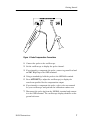
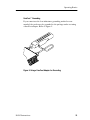
After installing the probe on the oscilloscope, perform a functional
check or compensate the probe using the PROBE COMPENSATION connections on the front panel of the oscilloscope. See
Figure 1. (The ground connection is not necessary for a functional
check.)
NOTE. You can compensate the probe only if your oscilloscope
supports the TEKPROBE interface and has a calibration routine for
that purpose. For instructions, refer to the user manual of your
oscilloscope.
6
P6243 Instructions