1
WAX2F
RM-ED008
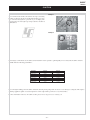
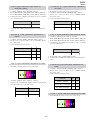
4. Set up TEST_G_LEVEL=51 and adjust R_BKG and B_BKG
values to within the spec of the table below.
3-5. Panel Replacement
When replacing the panel please reset the gamma and white balance
before performing W/B (See page 27, 3-4) for new panel.
X
Y
Spec.
40"
0.1964
0.4482
0.0028
3-6. Board Replacement
46"
0.1978
0.4524
0.0028
3-6-1. AE Board Replacement
5. Continue tracking the values of items 3) and 4) until they are all
within spec.
6. Send COLOR_SAVE command.
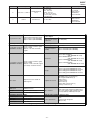
3-4-5. White Balance of Colour Temperature
“Warm 2”
Y
Spec.
40"
0.1988
0.4596
0.0014
46"
0.2002
0.4617
0.0014
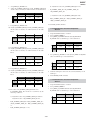
4. Set up TEST_G_LEVEL=51 and adjust R_BKG and B_BKG
values to within the spec of the table below.
X
Y
Spec.
40"
0.1974
0.4555
0.0028
46"
0.1984
0.4599
0.0028
3-6-2. BE Board Replacement
When replacing the ‘BE’ board please readjust the AD (See page 25,
3-2) and readjust the W/B (See page 27, 3-4).
Note :
In the event of a ‘BE’ board being re-used in service please
ensure that the Serial number is cleared in the NVM.
1. Set up initial White Balance condition.
2. Set up COLOR_TEMP=3.
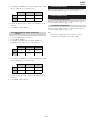
3. Set up TEST_G_LEVEL=204 and adjust R_DRIVE and
B_DRIVE values to within the spec of the table below.
X
When replacing the ‘AE’ board please readjust the AD (See page 25,
3-2) and readjust the W/B (See page 27, 3-4).
5. Continue tracking the values of items 3) and 4) until they are all
within spec.
6. Send COLOR_SAVE command.
- 29 -