1
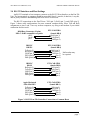
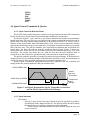
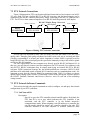
PTU-D300 User’s Manual (v2.19) NETWORKING 7.2 PTU Network Connections Figure 6 illustrates how PTUs can be networked and connected to a host computer via its RS232 port. Each PTU has a built-in RS-232 to RS-485 converter, and the host computer can be connected to the RS-485 controller network by simply connecting to the RS-232 connector on a PTU. The PTUs are then connected together via an RS-485 multi-drop network (full duplex). RS-485 Multi-Drop Network 120 1% terminator 120 1% terminator (full duplex) ••• HOST COMPUTER net/termin. network ••• net/termin. PTU-NCONN network PTU-NCONN network net/termin. PTU-NCONN Figure 6: Making PTU Network Connections Several issues are important to note when you make your own data cables. First, use a good quality cable. Though a good quality telephone cord cable can be used, use of a twisted pair cable is highly recommended. A twisted pair whose impedance is about 100 is typically used for longer RS-485 runs. The twisted pair provides good noise immunity owing to the relative signals used by the RS-485 standard. For some applications, the host computer may directly provide RS-485 full-duplex I/O. In this case, you may directly connect your host computer to the PTU network. For computers with only RS-232, RS-485 connections may be simply made using an external RS-232 to RS-485 converter. FLIR Commercial Systems, Inc. has tested/qualified two converters: ATEN IC-485S and Moxa A50 which both require a flipped RJ-12 connector (such as a standard phone cord). It is important to note that the network should be terminated using 120 1% resistors to protect against signal ringing on the network. Termination is achieved by placing the resistors between the RS-485 Transmit+/Transmit- and Receive+/Receive- wires at each end of the multidrop wiring network. 7.3 PTU Network Software Commands This section describes the pan-tilt command set used to configure, set and query the network configuration of your PTU controllers. 7.3.1 Unit Network ID Description Specify or query the PTU controller network unit ID number. By default, the PTU unit ID is set to zero which indicates the PTU controller is not networked, and the PTU controller is in the default interactive communications mode. When assigning a unit ID number to a controller, the unit ID number should be unique, the controller should be the only PTU controller attached to the host computer or terminal (otherwise other page 29