1
Getting Started
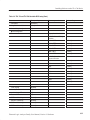
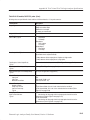
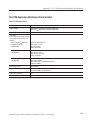
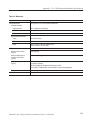
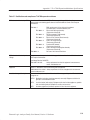
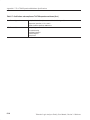
expression (High/Low) for these signals. Please use the tables in Appendix E to
convert physical expressions to logical expressions or vice versa.
Turning On the TLA 700 Series Logic Analyzer
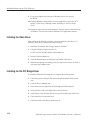
Follow these steps to turn on the logic analyzer for the first time:
CAUTION. Connect the keyboard, mouse, and other accessories before applying
power to the mainframe.
Connecting the accessories after turning on the mainframe can damage the
accessories.
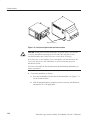
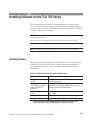
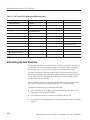
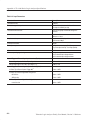
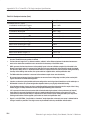
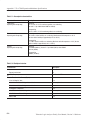
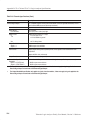
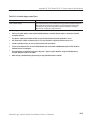
1. Check that the line fuse is correct for your application. See Table 1–2.
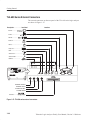
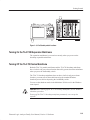
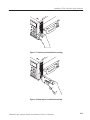
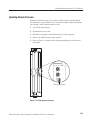
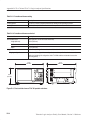
2. Connect the power cord. See Figure 1–32.
3. If you have an external monitor, connect the power cord and turn on the
monitor.
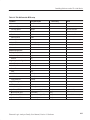
Table 1–2: TLA 700 series line fuses
Line voltage
Rating
Tektronix part number
90 V to 132 V operation
8 A, fast blow, 250 V
159-0046-00
207 V to 250 V operation
6.3 A, fast blow, 250 V
159-0381-00
90 V to 132 V operation
20 A, slow blow, 250 V
159-0379-00
103 V to 250 V operation
15 A, fast blow, 125 V
159-0256-00
207 V to 250 V operation
6.3 A, fast blow, 250 V
159-0381-00
Portable mainframe
Benchtop mainframe
Tektronix Logic Analyzer Family User Manual, Version 3.2 Software
1–31