1
CUBE™ Laser Operator’s Manual
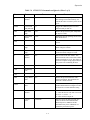
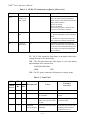
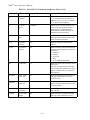
Table 5-9. Pulsed RS-232 Commands and Queries (Sheet 4 of 4)
COMMAND
FUNCTION
RANGE
DESCRIPTION
?INT
or ?LCK
*Interlock
Status
0, 1
Returns the status of the interlock DE-15
pin 1 status.
1 = Closed
0 = Open
?PVPS
*Protocol
Version
N/A
Reads the software protocol version.
If the Coherent CUBE firmware is
imbedded into a process, the ?PVPS query
can be used to check for changes in the
command structure.
If the firmware version changes without
changes to the command structure,
the ?PVPS query will return the same
value for separate firmware versions.
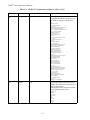
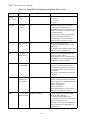
T
***Turns TE
ON
0, 1
Reads or Sets the TEC status.
1 = Enables temperature control of the
laser diode.
0 = Disables the temperature and turns the
laser emission off, automatically.
CW
***CW or
Pulse Mode
0, 1
Switches the operating mode from CW
(CW=1) to pulse (CW=0).
If pulse mode is set, the laser will run at the
threshold power if no voltage is present at
the digital pulse input connector.
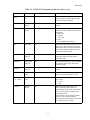
ANA
***Analog
Control Mode
0, 1
Switches between control of the current
(ANA=1) or power (ANA=0) by the
external analog control line. A query of
this command returns the status of this
command.
The ANA=1 command is not available in
CW mode.
EXT
***Ext.
Analog laser
pwr. control
0,1
Commands either the power or current to
be set by the external Analog Modulation
input. A query of this command returns the
status of this command.
EXT=1 for external
EXT=0 for internal.
The external connector is located at the
laser pin 8 on the DE-15 connector.
CAL
***Cal. Laser
Power in Pulse
Threshold - MAXLP
Sets the calibration of the laser output
power (in pulse mode) by:
– Closing the light feedback loop
– Adjusting the current to bring the power
back to a specified set level
Entering a value for the CAL command
sets the amplitude of a digital pulse to a
specified level.
5 - 16