1
6. CALORIE / PARAMETER SETTING
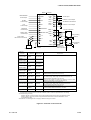
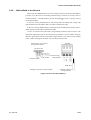
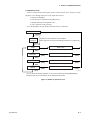
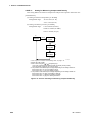
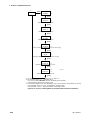
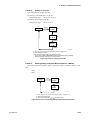
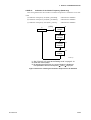
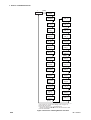
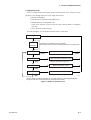
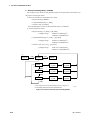
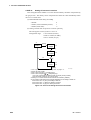
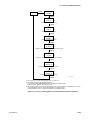
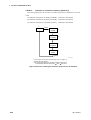
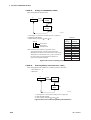
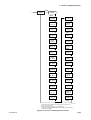
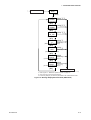
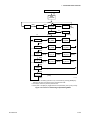
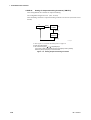
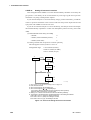
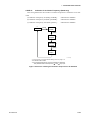
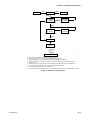
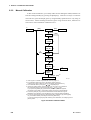
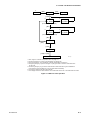
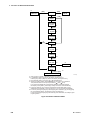
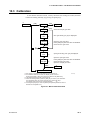
(2) Density/Calorie Conversion Factor Setting Mode
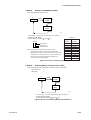
In order to this mode, select "MAN.CAL" in before page, and press [YES] key.
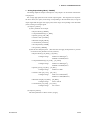
This mode is used to set a factor for converting density to calorie. This setting is mandatory when measuring the calorie.
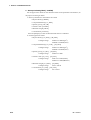
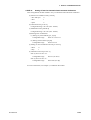
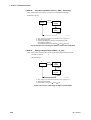
(a) Automatic zero-point adjustment [AT_ADJ] : 0 to 133.000, 0 to 3.5000
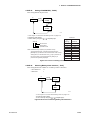
(b) Factor setting [SET_K] :
• Zero point [K0_ADJ] :
-99999 to 99999
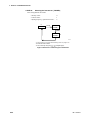
• K0 [K0] :
-99999 to 99999
• K1 [K1] :
-99999 to 99999
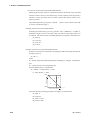
Note: The result of executing item (a) above is also reflected on [K0_ADJ] in item (b).
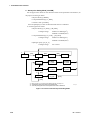
*1
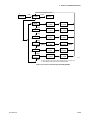
MAN.CAL
[YES]
ZERO
[NO]
SPAN
[NO]
Measurement mode
ADJUST
[YES]
[YES]
[NO]
AT_ADJ
SET_K
[YES]
[YES]
XXX.XXX
VALVE
END
[NO]
X.XXXX
*3
K0_ADJ
[ENT]
XXX.XXX
CAL.SET
[NO]
*2
[ENT]
X.XXXX
*4
K0
*2
[ENT]
[ENT]
X.XXXX
K1
*2
[ENT]
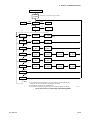
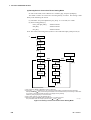
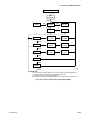
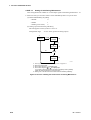
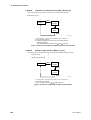
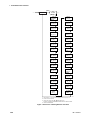
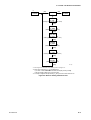
*1: See "Figure 6.1 Moles of Operation Level" on page 6-7.
*2: Using the [ ], [ ] and [ENT] keys, set a value (numeral position of the decimal point and sign).
Each press of the [ ] key moves through the fields of the numeral decimal point and sign in this order.
If you enter a value that exceeds the limits, the display shows [*OVER]
Press the [YES] or [NO] key to re-set the value.
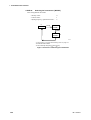
*3: Set a value using the [ ], [ ] and ENT keys.
*4 When the reading stabl1izes, press the [ENT] key to confirm the factor.
F6.2.eps
This parameter does not accept input from the [ ] and [ ] keys.
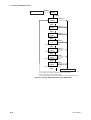
Figure 6.2 Density / Calorie Conversion Factor Setting Mode
6-8
IM 11T3E1-01E