1
BRI Card User Manual – Version 1.0
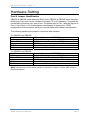
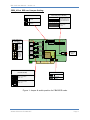
CEM_4 Port BRI card Jumper Setting:
Power feeding Only for NT Mode)
Pullup/Pull down for TE/NT(SW6)
1
2
3
4
1
2
3
4
Switch in ON Position:
TE Mode
Switch in Off Position:
NT Mode
Without jumper:
TE Mode
SW6
Jumper Settings for
TE/NT Mode
J13-J16
Set all
jumpers to
the right
to select
NT Mode
for this
port.
PORT
4
Set all
jumpers to
the left to
select TE
Mode for
this port.
PORT
2
SW4
+40V
1
2
3
4
T4
J9-J12 SW3
P2
+40V
T3
J5-J8
SW2
+40V
P3
T2
P6
+40V
LDO
J1-J4
PORT
1
P5
PCM IN
PCM OUT
PORT
3
With jumper:
NT Mode (connect the
jumpers as per the port
number identification on
top).
+40V
SW1
HFC-4S
P6 – to use
only for NT
mode
SMPS
POWER
T1
Osc
Termination of S/T Interface(100ohm)
(SW1,SW2,SW3,SW4)
+3.3V Power Selection
PCI +3.3V
Switch in ON Position:
MODE = NT
+5V to 3.3V
converter
Switch in OFF Position:
MODE = TE
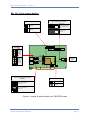
Figure 1: Jumper & switch position for CB400P/E cards
WWW.CEM-SOLUTIONS.NET
Page 3