1
TANK-101B/BW Embedded System
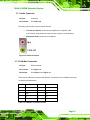
Activity/Link LED
Speed LED
STATUS
DESCRIPTION
STATUS
DESCRIPTION
Off
No link
Off
10 Mbps connection
Yellow
Linked
Green
100 Mbps connection
Blinking
TX/RX activity
Orange
1 Gbps connection
Table 3-5: RJ-45 Ethernet Connector LEDs
3.7.5 3-pin Power Terminal Block
CN Type:
3-pin terminal block
CN Location:
See Figure 1-3
N Pinouts:
See Figure 3-12
Connect the leads of a 9V~36V DC power supply into the terminal block. Make sure that
the power and ground wires are attached to the correct sockets of the connector.
Figure 3-12: 3-pin Terminal Block Pinout Location
3.7.6 RS-232 or RS-422/485 Serial Port Connectors
CN Label:
COM1, COM2, COM3 and COM4
CN Type:
DB-9 connectors
CN Location:
See Figure 1-3
CN Pinouts:
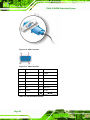
See Table 3-6 and Figure 3-14
RS-232 or RS-422/485 serial port devices can be attached to the DB-9 ports on the rear
panel.
Step 1: Locate the DB-9 connector. The locations of the DB-9 connectors are shown
in Figure 1-3.
Page 24