1
they are saved in a configuration file so
that it can be recalled for the Windows
Media Encoder at a later time.
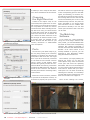
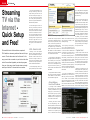
■ The Windows Media Encoder main window
In our test the preparation and initialization of the A/V stream functioned
perfectly with the help of the video capture card. Even during an active transmission, the load on our test PC was not
enough to prevent us from performing
other operations on the PC quickly and
at the same time.
■ The compression bitrate
On the reception side of things, the
widely used Windows Media Player, a
basic feature included with every MS
Windows installation, can be used for
reception. The stream is accessed via
the menu item “Open URL” using an
address such as “tele-satellite.dyndns.
org:4001” where “tele-satellite.dyndns.
org” is the host address and 4001 represents the streaming port.
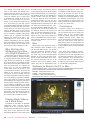
■ We used a Hauppauge video capture card
for our tests
Now we can not only watch A/V content on any PC anywhere in the world,
but it’s also possible through the
receiver’s web interface to control the
receiver and turn on your PC remotely
using WOL. This can be done either by
sending the WOL signal via a command
line request to your PC at home or by
doing it through the website http://
www.dslreports.com/wakeup.
This leaves us with only one unresolved scenario: how do you handle
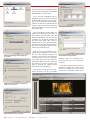
■ Either a direct connection is created or the
stream is sent to a server
■ The desired port is user selectable
14
■ It’s ready to go!
TELE-satellite — Global Digital TV Magazine — 06-07/2010 — www.TELE-satellite.com
■ The stream is clearly identified
problems with the streaming software and how do you turn off the PC
remotely?
A number of Remote Access Tools are
available to handle this. These would
have to be installed on the PC at home
as well as on a portable receiver (such