1
User Manual and Reference Guide
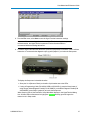
The system displays the progress of the firmware upgrade. After complete, a message displays
that the firmware upgrade was successful.
About the Call Book
The Call Book is required in Point-to-Point networks. While the call book is an option in Point-to-MultiPoint
networks, the Network ID feature is strongly recommended in most applications. The instructions provided in
this section are for Point-to-Point mode only. Use of the Call Book for MultiPoint networks is explained later in
this chapter.
Using the Call Book offers both security and flexibility in determining how FreeWave transceivers
communicate with each other.
You must set the following for two FreeWave transceivers to communicate in Point-to-Point mode:
1. The Master’s serial number must be listed in the Slave's Call Book or Slave Security is turned off
in the Slave.
2. The Slave’s serial number must be listed in the Master's Call Book.
3. The Master must be programmed to call the Slave.
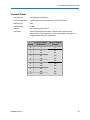
The Call Book allows you to incorporate up to 10 FreeWave transceivers, designate 1 to 4 Repeaters to use
with each transceiver, and designate which Slave the Master calls. To set the Entry to Call option, select the
number in the Entry to Call field, select All to direct the Master to call all Slaves.
Note: To set the Entry to Call option in HyperTerminal, enter C at the Call Book
menu, followed by the menu number corresponding to that Slave. To call any
available Slave in the list, enter C then enter A to direct the Master to Call All.
It is important that the Call Book slots (0-9) are filled sequentially starting with slot 0. When a Master is
instructed to Call All, it calls all Slaves listed until it reaches the first serial number of 000-0000 (or a blank
slot). If a serial number is entered after the all zero number or as a Repeater, the Master does not recognize it
as a valid number.
Note: When entering numbers into the Call Book, you need only define Repeaters in
the Master's Call Book. The Slave Call Book only requires the Master’s serial
number. A Repeater need not have anything listed in its Call Book.
To set the call book in Tool Suite:
1. In the Tool Suite Configuration application, select the device to program and click the (2) Call
Book tab.
2. In the Number column in Row 0, enter the seven-digit serial number of the transceiver being
called.
3. In the Repeater 1 column, enter Repeater 1’s seven-digit number. If no Repeaters are being used,
leave the column empty.
4. In the Repeater 2 column, enter the second Repeater’s seven-digit number. If only one Repeater
is being used, leave the column empty.
5. If Repeaters are being used, select the appropriate Entry to Call option in the Master's Call Book.
The system refreshes the transceiver’s Call Book with the new changes.
LUM0002AI Rev A
19