1
Setting for Electronic Counter
Pulse output
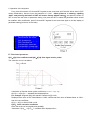
The flow integrating instrument can display 4 digit of instant flow, with 1 digit accuracy after
decimal(0-999.9m3/h) or 2 digits(0-99.99m3/h)after decimal. The accumulative flow function can display
accumulated flow, with 4 digit accuracy after decimal(0-9999.9999m3/h) or 5 digit (0-999.99999m3/h) after decimal.
The flow integrating instrument adopts instant flow and accumulated flow switching display methods and
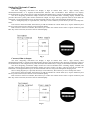
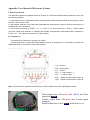
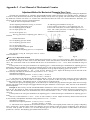
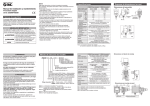
provides three-wire system pulse remote transmission output, see Fig.4. All key operation must be done while the
instrument is running(With flow input). Or the instrument will be in low-power dissipation sleeping status.
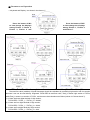
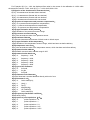
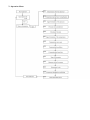
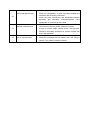
SET is setting key(Only it is pressed first, other keys can be effective); Press this key to set or modify flow
factor.
INC means to add one number; Press this key to add one number for current factor (0-9). If press FA/SL key and
INC key at the same time, the factors can be increased rapidly.
DEC means to reduce one number; Press this key to reduce one number for the factor. If press FA/SL key and
DEC key at the same time, the factors can be reduced rapidly.
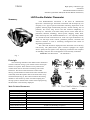
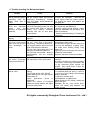
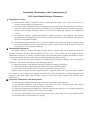
Fig. 7
Current(4-20mA) Output
The flow integrating instrument can display 4 digit of instant flow, with 1 digit accuracy after
decimal(0-999.9m3/h) or 2 digits(0-99.99m3/h)after decimal. The accumulative flow function can display 8 digit of
accumulated flow, with 4 digit accuracy after decimal(0-9999.9999m3/h) or 5 digit (0-999.99999m3/h) after decimal.
The flow integrating instrument adopts instant flow and accumulated flow switching display methods and
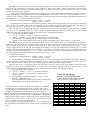
provides 4-20mA current remote transmission output (two-wire system), see Fig.5. All keys must be set while the
instrument is running(With flow input). Or the instrument will be in low-power dissipation sleeping status.
SET is setting key(Only it is pressed, other keys can be effective); Press this key to set or modify flow factor.
INC means to add one number; Press this key to add one number for current factor (0-9). If press FA/SL key and
INC key at the same time, the factors can be increased rapidly.
DEC means to reduce one number; Press this key to reduce one number for the factor. If press FA/SL key and
DEC key at the same time, the factors can be reduced rapidly.
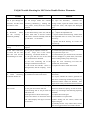
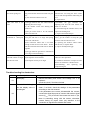
Fig. 8