1
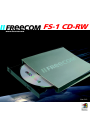
FREECOM FS-1 CD-RW
1.1 USB driver installation
GB
Your FREECOM FS-1 CD-RW is fully backwards compatible with USB 1.1. The
installation for USB 1.1 is the same as described below for USB-2.
1
1.1.1 Driver Installation under Windows ME / 2000 / XP
Under Windows ME/2000/XP a separate FREECOM driver is not required. The
drivers for Windows ME, Windows 2000 and Windows XP will be installed
automatically by the operating system after plugging in the FREECOM FS-1 CDRW into the USB port of the computer.
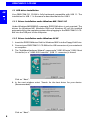
1.1.2 Driver installation under Windows 98 SE
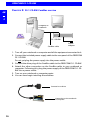
1. Insert the FREECOM driver Disk for Windows 98 SE into the Floppy Disk Drive.
2. Connect your FREECOM FS-1 CD-RW to the USB connector of your notebook
or computer.
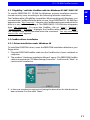
3. The "Add New Hardware Wizard" opens and a "USB 2.0 Device" (USB-2 Host
Controller) or a "USB2-IDE Controller" (USB 1.1 connector) is found.
Click on "Next".
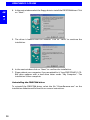
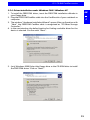
4. In the next window select "Search for the best driver for your device.
(Recommended)".
Click on "Next".
8