1
Start/Stop Data Acquisition (DAQ)
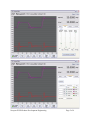
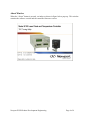
Press the “Start DAQ” button to command the software to collect setpoint resistance or
temperature, actual resistance or temperature, actual current and actual voltage from the
controller. The desired sampling interval and the number of samples can be changed from the
Setup tab. The software data buffer size is determined based on the number of samples
specified.
The software allows two data acquisition modes: continuous and fixed. In continuous mode, the
software only keeps the latest samples in its data buffer. All older samples are discarded. It
continues to acquire data until the “Stop DAQ” button is pressed. In fixed mode, the software
acquires the desired number of samples and stops the DAQ process automatically. If the number
of samples and/or the sampling interval are changed while data acquisition is underway, the
software will clear all the previously acquired data and restart the DAQ process.
A progress bar below the graph is used to display the percentage of data acquisition completed.
Tune TEC
Press the “Tune TEC” button to command the software to momentarily turn the TEC output
OFF, setup the controller (mode, setpoint, limits, PID gains) based on values specified in Setup
and PID tabs, and to turn the TEC output ON. The software will automatically start data
Newport PCSB Product Development Engineering
Page 3 of 6