1
USER MANUAL
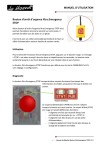
Xtra.Emergency STOP Button
Our Xtra.Emergency STOP Button allows you to further
improve safety on your track. The Xtra.Emergency STOP
Button has one button which stops all karts when activated.
The Xtra.Emergency STOP Button is supplied with a preinstalled collar to install a 2-wire AC power round cable.
Usage
To use the Xtra.Emergency STOP Button, press the red button. When the button is pressed, a
“STOP” message will be sent to all karts every second. The button remains in “pressed” state
until it is released by clockwise rotation of the button.
The Xtra.Emergency STOP Button works by default for FUEL and EV karts with no
adjustments or configuration required.
Diagnostics
The Xtra.Emergency STOP Button features two internal LEDs. These LEDs provide
information about the Xtra.Emergency STOP Button. The LEDs can only be seen after
opening the housing.
LEDs
The power LED (PWR) is green and illuminates when AC
mains power is applied. The status LED (STAT) is red and
features several functions:
- Flashes once a second when a command (e.g.
“STOP”) is sent
- Flashes an additional three times when AC power is
lost
- Flashes an additional three times when battery
power is low.
-1-
User Manual Xtra.Emergency STOP Button V1.0
USER MANUAL
Button
pressed
No
Yes
No
Yes
No
Yes
AC mains power
applied
Yes
Yes
No
No
No
No
Battery
low
No
No
No
No
Yes
Yes
Status
Flashes
0
1
3
4
6
7
Power LED
On
On
Off
Off
Off
Off
Remark: the AC mains power lost and low battery status indications are only shown once
every 30 minutes. This is implemented to provide extra power saving when powered from
the backup battery.
Besides the “STOP” command, the Xtra.Emergency STOP Button can send two more
commands:
- “AC_LOST” when AC mains power is lost
- “LOW_BAT” when the battery is running low.
These commands are sent at the same interval rate as the status LED flashes.
Configuration
The Xtra.Emergency STOP Button has tracks A, B, C and D activated by default.
To change the track settings of the Xtra.Emergency STOP Button, open the housing and
move the track switches to the proper settings.
By default, all switches are in the “OFF” position. If all switches are in either the “ON” or
“OFF” position, all tracks are enabled or off, respectively.
Changing one or more switches to the “ON” position enables the relevant track.
Track settings
-2-
User Manual Xtra.Emergency STOP Button V1.0
USER MANUAL
Operating range
The operating range of the Xtra.Emergency STOP Button varies depending on location,
nearby conductive parts and other conditions. If you are unable to control your full track,
we suggest using our Xtra.Range Extender/Access point.
Backup battery
The Xtra.Emergency STOP Button features a rechargeable backup battery if AC mains power
is lost. The battery provides enough energy to allow the Xtra.Emergency STOP Button to
work for at least an additional 8 hours.
When AC mains power is applied, the battery will recharge automatically.
Attention: The backup battery can only be recharged when AC mains power is present and
the temperature is between 0 OC and 50 OC.
Warning: The backup battery is inaccessible and irreplaceable. Do not try to replace or
remove the battery.
Installation
Firmly mount the Xtra.Emergency STOP Button with the antenna pointed upwards.
Mounting the Xtra.Emergency STOP Button on a metal surface can significantly reduce the
operating range.
Please provide continuous AC mains power to the Xtra.Emergency STOP Button. The device
is intended to be permanently connected to the AC power supply.
The cable used to connect the Xtra.Emergency STOP Button to the AC power supply should
have an outer diameter between 5 mm and 13 mm. Outside these limits, the IP rating
cannot be guaranteed.
Please note that the Xtra.Emergency STOP Button only has a line and neutral connection. It
is not necessary to install a protective earth cable.
Please have the Xtra.Emergency STOP Button installed by a certified electrician. Make sure
that the installation meets your country’s regulations / laws.
-3-
User Manual Xtra.Emergency STOP Button V1.0
USER MANUAL
Specifications
Buttons
Tracks
Function assignment
Speed limit control (FUEL) karts (all karts only)
Speed limit control (EV) karts (all karts only)
Additional commands
Indicators
Operation range
Batteries
Supply voltage
Supply power
Dimensions (LxWxT)
Weight
Operation temperature
Operation humidity
IP rating
Electrical safety class
1 (STOP button)
Any combination of 4 tracks
Fixed
Stop
Stop
Not applicable
Red status LED and green power LED
50 m
1 x non-replaceable rechargeable LiPo battery
85-265VAC 50-60Hz
Max 5watts
230x80x115 mm
0.3 kg
0 … +55 degrees Celsius
Max 85% relative no condensation
65
II
Warranty
1. De Haardt Electronic Engineering BV guarantees that the goods can perform the tasks stated in the manuals,
descriptions and documentation for 12 months after delivery of the goods sold or provided for use.
2. The liability under the guarantee provided in this article is limited to De Haardt Electronic Engineering BV’s choice
to remedying material and manufacturing faults free of charge in De Haardt Electronic Engineering BV’s own
workshop, supplying new parts free of charge and taking back and acquiring the ownership of the non-functioning
parts, or applying a price reduction by agreement with the other party on the goods supplied or provided for use.
De Haardt Electronic Engineering BV cannot under any circumstances be obliged to come to the location of the
delivered goods to establish defects claimed by the other party. Equally, De Haardt Electronic Engineering BV
cannot be compelled to carry out repair work outside its own workshop.
3. The guarantee referred to in the second paragraph does not cover the costs of disassembly, labour costs,
transport costs and call-out charges, all in the most general sense. These costs will be charged in all cases.
4. No guarantee is provided if:
changes have been made to the goods supplied by or provided for use by De Haardt Electronic Engineering BV
other than by De Haardt Electronic Engineering BV itself or persons expressly authorised by De Haardt Electronic
Engineering BV, unless De Haardt Electronic Engineering BV has agreed in writing to such changes in advance;
the defects in the goods supplied or provided for use by De Haardt Electronic Engineering BV are the result of:
neglect of the maintenance of the goods supplied or provided for use by the other party or other users;
improper use or use not in accordance with the instructions supplied by De Haardt Electronic Engineering BV for
the installation of the goods;
incompetent use and/or misuse of the goods supplied or provided for use by the other party or other users;
wear and tear;
repairs or replacements carried out by persons other than those expressly authorised to do so by De Haardt
Electronic Engineering BV, unless De Haardt Electronic Engineering BV has agreed in writing to such repairs or
replacements in advance.
5. Work not covered by the guarantee as referred to in this article shall be charged to the other party in accordance
with De Haardt Electronic Engineering BV’s relevant current tariffs.
6. Notwithstanding the provisions in the preceding paragraphs, the guarantee provided by De Haardt Electronic
Engineering BV does not go beyond any guarantee provided to De Haardt Electronic Engineering BV by the
relevant manufacturer or supplier of the hardware and/or software and fulfilled in respect of De Haardt Electronic
Engineering BV. At the other party’s request, De Haardt Electronic Engineering BV shall inform the latter of the
content of the contracts entered into between De Haardt and its suppliers.
-4-
User Manual Xtra.Emergency STOP Button V1.0