1
Troubleshooting
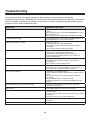
NOTE: When there is a problem in VGA mode (only when VGA mode is applied)
PROBLEM
POSSIBLE SOLUTION
The signal is out of range
- Adjust resolution, horizontal frequency, or vertical
frequency
- Check whether the signal cable is connected or loose
- Check the input source
Vertical bar or stripe on background, horizontal noise and Set the auto configure or adjust clock, phase or H/V
incorrect position
position
Screen colour is unstable or is a single colour
- Check the signal cable
- Re-install the PC video card
Maintenance
Early malfunctions can be prevented. Careful and regular cleaning can extend the amount of time you will
have with your new TV. Be sure to turn the power off and unplug the power cord before you begin any
cleaning.
Cleaning the screen
1. A great tip to dust off your screen. Wet a soft cloth in a mixture of lukewarm water and a little fabric
softener or dish washing detergent. Wring the cloth until it’s almost dry, and then use to wipe the
screen.
2. Make sure the excess water is off the screen, then let air-dry before you turn on the TV.
Cleaning the Cabinet
To remove dirt or dust, wipe the cabinet with a soft, dry, lint-free cloth. Please be sure not to use a wet
cloth.
Extended Absence
If you expect to leave your TV dormant for a long time (such as a vacation), it is a good
idea to unplug the power cord to protect against possible damages from lightning or
power surges.
33