1
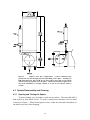
3 QUICK START 3.1 Software Installation The a-Sphere requires some or all of the following software for operation and data processing. Each of these has a straightforward installation process and is delivered on a CD. Drivers for a USB-serial port adapter (unless your computer has a built-in serial port, which is very unusual). The HOBI Labs program a-Sphere Console, which handles basic communication with the instrument under Microsoft Windows (using the USB-serial adapter). Simply run the program InstallaSphereConsole.exe on the supplied HOBI Labs CD. IGOR Pro from Wavemetrics, Inc., which is used to process and present calibrated data from the a-Sphere. This is not required in order to test basic operation, but is necessary for viewing data graphically. Igor Pro can be installed on either Windows or Mac OS X, by running the installer on the appropriate CD. 3.2 Unpacking and Setup When moving the a-Sphere, do not use any plastic fittings for lifting—grasp the instrument around its main body, or use the metal lifting eye on the end cap. It is safe to stand the a-Sphere vertically, resting on the three metal nuts that hold the removable part of the sphere in place. However we strongly recommend you secure it to a sturdy object when it is in this position, since it could easily be toppled if accidentally bumped. The inlet and outlet ports on the a-Sphere (see Figure 4) are normally plugged with small threaded fittings during shipping. You can gently unscrew these, and replace them with the supplied barbed tube fittings (see Figure 10). Tighten these only with moderate hand force. Connect the PDI cable. If your a-Sphere has a 4-pin connector, be careful that the stainless steel guide pin on the male connector does not accidentally get caught in one of the four large sockets. Connect the a-Sphere Power/Data Interface (PDI) cable’s DB-9 connector to the computer’s serial port. -7-