1
8
8.1
INFORMATION Menu and Others
INFORMATION
View the current input source, frequency and resolution.
8.1.1 Displaying INFORMATION
1
2
Press [ m ] on the product.
Press [
] to move to INFORMATION. The current input source, frequency and resolution will
appear.
PICTURE
COLOR
Analog
SIZE&POSITION
48.2kHz 60Hz NN
1024 x 768
SETUP&RESET
INFORMATION
Adjust
Exit
8.2
Enter
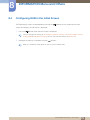
Configuring Brightness in the Startup Screen
Adjust Brightness using the [
] button in the startup screen where there is no on screen display menu
available.
1
Press [
] in the startup screen. The following screen will appear.
Brightness
Exit
2
Adjust the Brightness using the [
100
Adjust
Enter
] button.
8 INFORMATION Menu and Others
77