1
Command
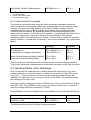
WR sp DM0 sp 2 cr
WR sp DM5 sp 10 cr
ST sp 1904 cr
Response
OK cr lf
OK cr lf
OK cr lf
Comment
Position rotation at slot 2
Select level 10 in cassette
Load Command to start Load process
To unload a plate form level 22 in the cassette at slot 1 and place it on the Transfer
Station to the command strings to be sent are:
Command
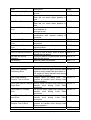
WR sp DM0 sp 1 cr
WR sp DM5 sp 22 cr
ST sp 1905 cr
Response
OK cr lf
OK cr lf
OK cr lf
Comment
Position rotation at slot 1
Select level 22 in cassette
Unload Command to start Load
process
If you simply want to remove a plate from the shovel by placing it to the transfer station
you may send:
Command
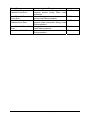
WR sp DM0 sp 1 cr
Response
OK cr lf
WR sp DM5 sp 1 cr
ST sp 1906 cr
OK cr lf
OK cr lf
Comment
Position rotation at any position; must
be defined
Select any level
Start execution of setting plate from
the shovel to the Transfer Station
Remember that Slot Position and Level Position must also be set at the "ST 1906" and
" ST 1907" command.
In order to transport one plate from level 15 of cassette 2 to level 17 of the same
cassette 2 the following sequence has to be sent:
Command
WR sp DM0 sp 2 cr
WR sp DM5 sp 17 cr
ST sp 1908 cr
Response
OK cr lf
OK cr lf
OK cr lf
RD sp 1915 cr
RD sp 1915 cr
WR sp DM5 sp 15 cr
ST sp 1909 cr
'0' cr lf
'0' cr lf
OK cr lf
OK cr lf
Comment
Position rotation at slot 1
Pick plate from level 17 of cassette 2
Start execution of Pick plate from
level 17 of cassette on the Shovel
System busy executing command
System Ready for next command
Select level 15
Place command to place plate form
shovel to the cassette
Please note that the slot position value in DM0 and / or the level information in DM5
remains in the Data Memories after completion of command. Therefore in above
example the "WR DM0 1" needs not to be sent again.
5.3.3 Extended Commands
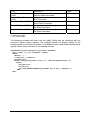
Read Error Flag (default =0)
LiCONiC
Command
RD sp 1814 cr
D:\Products\STX\Stx40\STX_UE\Stx_ue05.doc
Response
x cr lf
42/42