1
Projecting
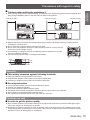
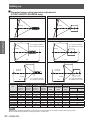
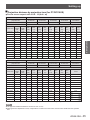
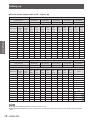
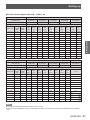
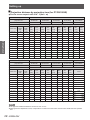
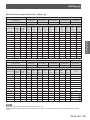
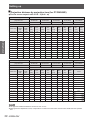
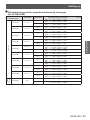
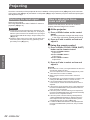
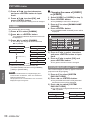
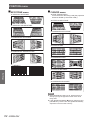
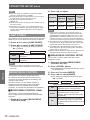
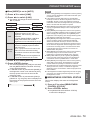
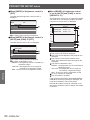
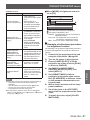
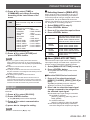
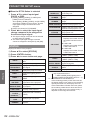
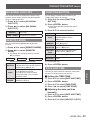
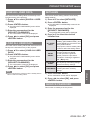
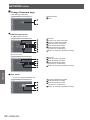
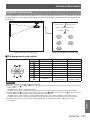
Adjustment range after lens position (optical shift)
Do not move the lens beyond the bounds of the shift range as this may cause a change in the focus. This
limitation is to protect the parts of the projector.
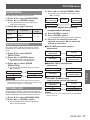
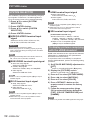
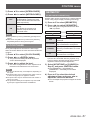
Using the standard projection position as the reference, the optical axis shift function makes it possible to adjust
the projection position in the ranges shown in the figures below.
Zoom lens
0.15 H
0.2 H
0.20 V
0.50 V
0.70 V
0.20 V
Projected screen
height, V
0.30 H
Projected screen
width, H
0.70 V
0.20 V
0.60 V
0.20 V
0.20 V
0.20 H
Standard
projection position
0.20 V
0.20 V
0.60 V
0.20 V
Projected screen
height, V
Standard
projection position
0.20 H
0.3 H
Projected screen
width, H
0.30 H
Projected screen
width, H
Note
zz The ET-D75LE5 has a fixed focal point, and so shift adjustment cannot be carried out.
ENGLISH - 43
Basic Operation
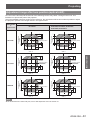
0.1 V
0.3 H
Projected screen
width, H
PT-DW90XE
0.50 V
0.1 V
Projected screen
height, V
0.1 V
0.40 V
0.12 V
Standard
projection position
0.1 V
0.12 V
0.40 V
0.12 V
Projected screen
height, V
Standard
projection position
0.2 H
0.2 H
Projected screen
width, H
0.12 V
PT-DS100XE
0.55 V
0.12 V
0.2 H
Projected screen
width, H
0.55 V
Standard
projection position
0.12 V
0.44 V
0.12 V
0.15 H
Projected screen
height, V
0.12 V
0.44 V
0.12 V
Projected screen
height, V
Standard
projection position
0.12 V
PT-DZ110XE
0.12 V
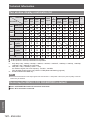
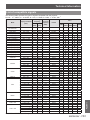
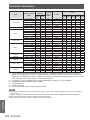
ET-D75LE1, ET-D75LE2, ET-D75LE3,
ET-D75LE4, ET-D75LE8, ET-D75LE10,
ET-D75LE20, ET-D75LE30
ET-D75LE6
0.12 V
Model number
of
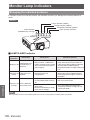
projection lens