1
If the messages are cut off, split, or missing upon playback, chances are that
the tape messages are too long to fit into the message slots, In this case, refer
to the message length tables and option select switch information earlier in this
manual, or contact your messaging provider to find the proper switch settings
for your tape.
Important: It is not necessary to leave the tape in the unit after
loading. Since the SoundBrick uses non-volatile Flash memory,
messages are not erased during power outages or when the unit is
unplugged or turned off. If you do decide to remove the tape,
LEAVE IT OUT. Every time you insert a tape with the power switch
on, all messages (tape and handset) are erased and the tape load
process begins.
Handset Load (Live Record)
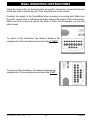
After loading the tape, you can record messages using the optional handset.
As mentioned earlier, make sure you use the Walker Equipment Corp. model
W3-K-M, not an ordinary handset from your phone.
While handset-loaded messages are safe from erasure due to power loss, they
are erased each time a tape is loaded, and must be recorded again if you want
them to play. Handset messages are not copied to the tape. Additionally,
handset-loaded messages are not automatically added to the timed play
sequence. After recording, you must manually add them using message
select.
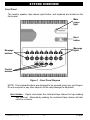
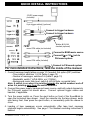
1. Press the Run/Setup button until the Setup light is on.
2. Press the Play/Record button until the Record light is on. The message
lights indicate which messages are already loaded (light on) and which
are empty (light off).
3. Press the message button that you wish to record. Recording begins as
soon as the message light starts flashing (approximately 1 second).
During recording, the message light flashes slowly. If it does not, then
you have selected a message higher than your number of messages
setting and must choose another.
4. When you are finished recording, press the message button again. If you
exceed the available message time, recording stops automatically.
To record more messages, follow steps 2-4 above. When you are finished,
proceed to message select.
Note: Because there is no Monitor Select, messages can not be
reviewed from the handset.
17
SoundBrick® 1400 DS
11/2007